
How do you build a website for an agritech company that works across agriculture, engineering, digital systems, EU projects, research, business innovation, field implementation, policy, robotics, and education — without making the homepage feel like a very polite spreadsheet?
That is the real challenge with complex B2B websites.
The problem is rarely lack of information.
The problem is usually the opposite.
There is too much information. Too many services. Too many projects. Too many stakeholders. Too many important things that “must be on the homepage.” And suddenly the website becomes a digital storage room with nice buttons.
You know the type.
A hero section that says “Innovating the Future.”
A services section with 16 cards.
A projects section that looks impressive but explains nothing.
A contact button sitting there like a waiter in an empty restaurant.
So in this article, we are not going to talk about how AI can magically design a website.
That is the children’s menu version of the conversation.
Instead, we are going to break down how to use AI, Figma, Claude Code, Vercel, and a few supporting tools to build a similar agritech website system from the ground up.
Not just prompts.
A workflow.
Because prompts alone do not create good websites.
Systems do.
First, Let’s Define the Real Problem
Imagine a company similar to AGFUTURA: a multidisciplinary innovation company working across agriculture, digital systems, engineering, project implementation, sustainability, and business development.
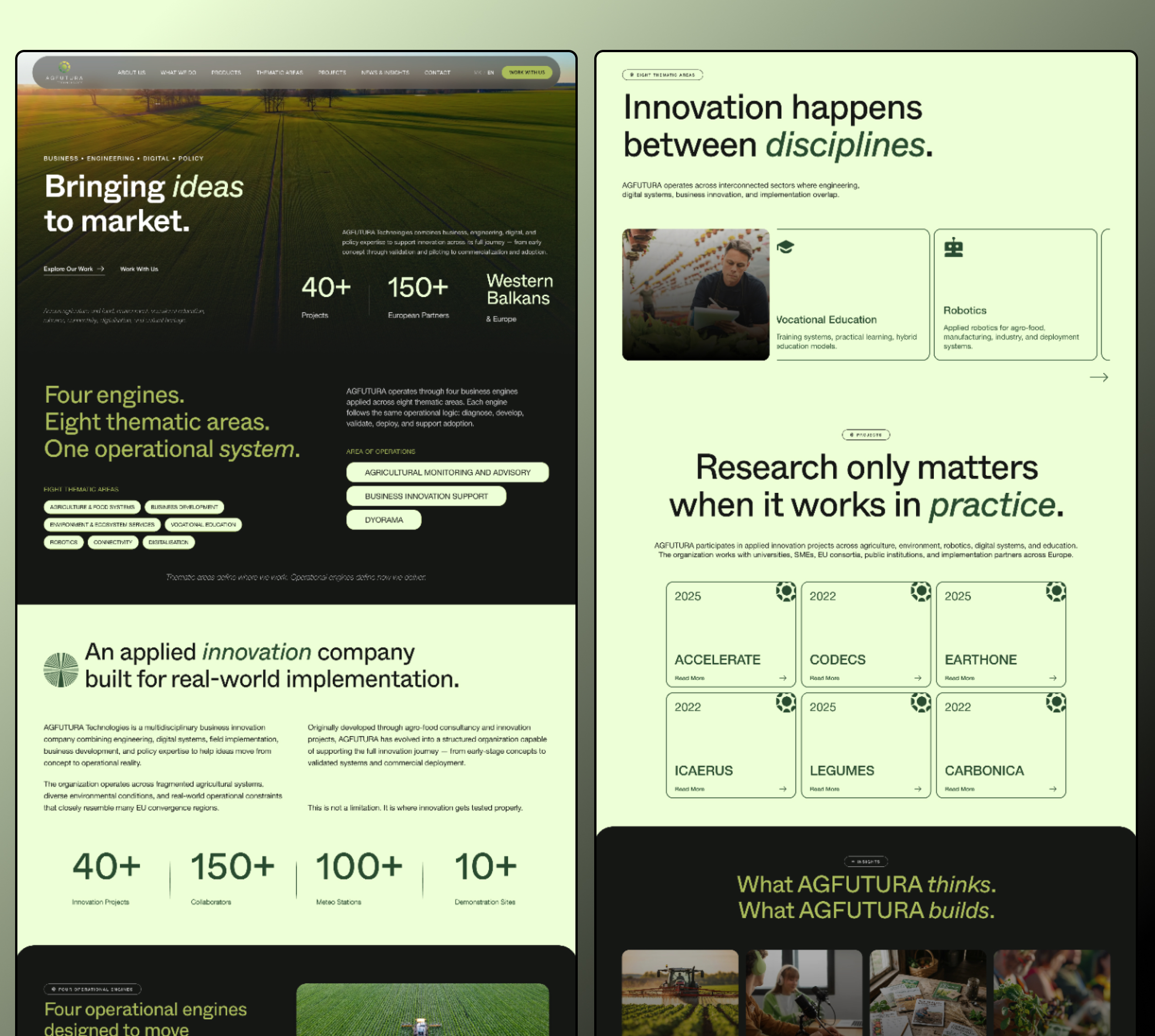
This kind of company is not simple.
It may work with:
- farmers
- public institutions
- EU project partners
- research organizations
- technology providers
- agri-food companies
- engineering teams
- local businesses
- educational institutions
- environmental stakeholders
That means the website has to speak to multiple audiences without turning into five different websites stapled together.
This is where many complex B2B websites fail.
They try to show everything before they explain anything.
And when everything is important, nothing becomes clear.
The first job is not design.
The first job is structure.
Before you open Figma, before you generate copy, before you ask Claude Code to build anything, you need to answer one question: What is the mental model of the business?
In plain English:
How should someone understand this company after 10 seconds on the website?
For an agritech innovation company, the answer might be something like: “We help move agricultural and environmental innovation from idea to real-world implementation.”
That is much better than:
“We deliver innovative multidisciplinary solutions across agricultural, environmental, engineering, policy, education, and technology ecosystems.”
That second version sounds like it escaped from a grant application and is now hiding in your navigation bar.
The AI Website Workflow
A proper AI-assisted website workflow should move through stages.
Not chaos.
Not “ask ChatGPT for a homepage and pray.”
A better workflow looks like this:
- Decode the brief
- Define the positioning
- Map the audience groups
- Build the content architecture
- Create the messaging hierarchy
- Define the visual direction
- Build the Figma system
- Convert the structure into code
- Deploy and test
- Prepare for iteration
Each stage can use AI, but AI should not replace the thinking.
It should speed up the thinking.
There is a difference.
Step 1: Decode the Brief With AI
The first AI task is not writing.
The first task is understanding.
You need to feed the AI the company description, existing website copy, service list, project descriptions, audience groups, and any strategic notes you have.
Then ask it to extract the actual website problem.
Prompt 1: Brief Decoder
Act as a senior website strategist for complex B2B and agritech companies.

Analyze the following company description and identify:

1. The core positioning problem
2. The main audience groups
3. The strongest trust signals
4. The biggest communication risks
5. The website’s primary business goal
6. The website’s secondary business goals
7. The clearest way to explain the company in one sentence
8. The sections the homepage likely needs

Company description:
[Paste company description here]

Existing services:
[Paste service list here]

Current projects / proof:
[Paste project list here]

Target audiences:
[Paste audience notes here]
What you are looking for
You are not looking for final copy yet.
You are looking for strategic raw material.
The AI should help you see:
- what the company actually does
- what makes it hard to explain
- who needs to understand it
- what the website must prove
- which ideas should be grouped together
- what should not be treated as separate islands
This is where the website begins.
Not in the hero design.
In the logic.
Step 2: Define the Positioning
Once the brief is decoded, the next step is positioning.
For a complex agritech company, this is usually the most important part.
Because if the positioning is vague, the whole website becomes vague.
This is where you can ask AI to create several strategic territories.
Prompt 2: Positioning Territories
Act as a brand strategist.

Create 5 possible positioning territories for a multidisciplinary agritech innovation company that works across agriculture, engineering, digital systems, environmental services, EU projects, education, business development, and field implementation.

For each territory, include:

1. Positioning name
2. One-sentence positioning statement
3. Core message
4. Best-fit audience
5. Tone of voice
6. Why this direction works
7. What this direction should avoid

The company should feel practical, credible, modern, field-connected, institutional enough for public/EU partners, and clear enough for business audiences.
Example positioning territories
You might get directions like:
- Applied Innovation Partner
- Field-to-Market Systems Company
- Agritech Implementation Hub
- Agricultural Transformation Partner
- Research-to-Reality Innovation Company
The final positioning does not need to use these exact labels.
But this exercise gives you strategic options.
For a company like this, I would probably lean toward: Applied Innovation, Built for the Field
Why?
Because it says the company is not just researching, advising, or producing documents.
It is helping ideas survive contact with reality.
That is the real value.
Step 3: Map the Audiences
A complex website fails when it treats every visitor the same.
An agritech innovation company may have very different audience groups.
For example:
- EU project partners want credibility and alignment.
- Farmers want practical value.
- Institutions want trust and seriousness.
- Technology partners want capability.
- Businesses want implementation.
- Researchers want depth and legitimacy.
Same company.
Different reader motivations.
So the next AI task is audience mapping.
Prompt 3: Audience Map
Act as a UX strategist.

Create an audience map for a multidisciplinary agritech innovation website.

Audience groups:
- Farmers and field operators
- EU project partners
- Public institutions
- Research organizations
- Agri-food businesses
- Technology partners
- Education and training partners
- Environmental stakeholders

For each audience, define:

1. What they need to understand quickly
2. What they care about most
3. What proof they need
4. What language will resonate with them
5. What website sections matter most to them
6. What call-to-action is most appropriate
Why this matters
This stops the website from becoming generic.
You are no longer designing for “users.”
You are designing for specific people with specific reasons to care.
The website can then guide different readers without building separate websites for all of them.
That is the magic trick.
Not flashy.
Useful.
Step 4: Build the Content Architecture
Now we move from strategy to structure.
This is where many AI-generated websites fall apart.
They produce a homepage that looks fine, but the structure is weak.
A serious B2B website needs a content architecture.
Not just sections.
A system.
Prompt 4: Website Architecture
Act as a senior information architect.

Design a website structure for a multidisciplinary agritech innovation company.

The company works across:
- agriculture and food systems
- engineering
- digital systems
- EU projects
- research and innovation
- business development
- environmental services
- vocational education
- robotics
- field implementation

Create:

1. Main navigation
2. Homepage section order
3. Core service pages
4. Thematic area pages
5. Project / case study structure
6. Insights / articles structure
7. Partner / credibility sections
8. Recommended calls-to-action
9. CMS content types
10. How the site should scale as more projects are added

Make the structure clear, practical, and suitable for institutional and business audiences.
What a strong structure might include
A website like this could use:
- Home
- About
- What We Do
- Thematic Areas
- Projects
- Insights
- Partners
- Contact
But the real work is inside those sections.
For example, “Thematic Areas” could include:
- Agriculture & Food Systems
- Environment & Ecosystem Services
- Business Development
- Vocational Education
- Robotics
- Connectivity
- Digitalisation
- Cultural Heritage
Meanwhile, “Projects” should not just be a gallery.
It should become a proof system.
Each project card should quickly communicate:
- project name
- category
- role
- partners
- outcome
- sector
- relevance
This makes credibility easier to scan.
And in complex B2B websites, scannable credibility is gold.
Step 5: Create the Homepage Messaging Hierarchy
Now you can start writing.
Not before.
The messaging hierarchy should answer questions in the right order:
- What is this company?
- Why does it matter?
- How does it work?
- Where does it operate?
- What proof exists?
- What can I explore next?
- How do I contact or collaborate?
Prompt 5: Homepage Messaging
Act as a senior B2B website copywriter.

Write homepage messaging for a multidisciplinary agritech innovation company.

The company helps move ideas from research and strategy into real-world implementation across agriculture, engineering, digital systems, environmental services, business development, education, and EU project ecosystems.

Create:

1. 10 hero headline options
2. 10 supporting subheadline options
3. A homepage narrative structure
4. Section headlines
5. Short section descriptions
6. CTA options
7. Messaging for project credibility
8. Messaging for thematic areas
9. Messaging for insights/articles
10. A closing CTA section

Tone:
Clear, credible, practical, modern, institutional but not boring.
Avoid generic innovation clichés.
Good headline direction
For this type of company, a good headline might be:
Bringing Ideas to Market
Why does this work?
Because it is simple and directional.
It suggests movement.
Idea → validation → deployment → market.
That is much stronger than “Empowering Sustainable Innovation for Tomorrow.”
Which, let’s be honest, sounds like it was assembled from spare parts in a LinkedIn factory.
Step 6: Build the Visual Direction
Now we can talk design.
For an agritech website, the easy mistake is making everything green, adding a leaf, and calling it a day.
That is not visual strategy.
That is salad branding.
A stronger visual direction should reflect the company’s actual role.
If the company sits between agriculture, engineering, research, and implementation, the visual system should feel:
- field-connected
- structured
- modern
- calm
- credible
- practical
- technical, but not cold
- institutional, but not dead
Prompt 6: Visual Direction
Act as an art director and UI designer.

Create 3 visual directions for a multidisciplinary agritech innovation website.

The brand should feel:
- modern
- practical
- credible
- field-connected
- institutional enough for EU/public partners
- clear enough for business audiences
- technical but not cold
- agricultural but not rustic

For each direction, include:

1. Direction name
2. Visual style
3. Color palette
4. Typography style
5. Imagery direction
6. UI component style
7. Layout principles
8. What this direction communicates
9. What to avoid
Possible visual direction
One strong direction could be: Calm Applied Innovation
This could use:
- soft agritech green
- dark charcoal sections
- field imagery
- structured content cards
- rounded containers
- clean typography
- metrics blocks
- project cards
- restrained iconography
The goal is to make the site feel agricultural without becoming rustic.
Modern without becoming startup-cliché.
Institutional without becoming sleepy.
Again, tightrope.
Step 7: Turn the Strategy Into a Figma System
Now Figma enters the picture.
This is where the strategy becomes visible.
You are not just designing a homepage. You are building a design system that can support future pages, future content, and future projects.
What to create in Figma
Start with:
- color styles
- typography scale
- grid system
- buttons
- tags
- cards
- project modules
- metrics blocks
- navigation
- footer
- image treatment
- section spacing
- responsive rules
Prompt 7: Figma Component Plan
Act as a senior product designer.

Based on this website strategy, create a Figma component plan for an agritech innovation website.

Include components for:

1. Hero section
2. Navigation
3. Thematic area cards
4. Project cards
5. Metrics/proof section
6. Operational engine cards
7. Insight/article cards
8. Partner/logo strip
9. CTA sections
10. Footer
11. Mobile versions
12. CMS-ready reusable patterns

For each component, explain:
- purpose
- content fields
- visual behavior
- responsive behavior
- where it appears on the site
Why components matter
Because complex companies grow.
They add projects.
They add partners.
They add services.
They publish articles.
They join initiatives.
They update their proof.
If the site is not built with reusable components, every update becomes a mini redesign.
And nobody wants that.
Especially not the poor person who has to update the “Projects” page on a Friday afternoon.
Step 8: Use AI to Stress-Test the Website Structure
Before you build anything, use AI to critique your own structure.
This is useful.
Painful, but useful.
Prompt 8: Website Critic
Act as a skeptical B2B website strategist.

Review this proposed website structure for a multidisciplinary agritech innovation company.

Structure:
[Paste sitemap and homepage sections]

Tell me:

1. What is unclear?
2. What feels too generic?
3. What important audience might feel underserved?
4. Where is the messaging too broad?
5. Which sections should be merged?
6. Which sections are missing?
7. What could make the website feel more credible?
8. What could make the website easier to scan?
9. What should be removed?
10. What would you improve before design begins?
Why this helps
Because AI is very useful as a second brain.
Not because it is always right.
Because it can force you to notice weak spots.
The trick is to ask it to be critical.
If you ask, “Is this good?” it will usually politely clap.
Ask it to tear the thing apart.
Much more useful.
Step 9: Move From Figma to Code With Claude Code or Cursor
Once the Figma system is clear, you can move toward implementation.
This is where tools like Claude Code or Cursor can help turn your structure into reusable front-end components.
This is not “AI builds the website for you.”
This is:
You provide the strategy, structure, component logic, visual rules, and content model.
Then AI helps speed up production.
Prompt 9: Front-End Component Structure
Act as a senior front-end developer.

Create a Next.js component structure for an agritech innovation website.

The site includes:

- Hero section
- Thematic area grid
- Project card grid
- Metrics section
- Operational engines section
- Insights grid
- Partner strip
- CTA section
- Footer

Use reusable components.
Make the structure CMS-ready.
Use clean naming.
Use responsive layout logic.
Assume the design system includes colors, typography, spacing, buttons, cards, and tags.

Return:
1. Folder structure
2. Component list
3. Props for each component
4. Sample data structure
5. Notes for responsive behavior
Example components
You might end up with:
<Hero /><ThemeCard /><ProjectCard /><MetricBlock /><EngineCard /><InsightCard /><PartnerStrip /><CTASection /><Footer />
This matters because the website needs to scale.
If project cards, thematic pages, and insights are componentized properly, you can connect them later to a CMS.
Step 10: Create the First Page Build
Once the component structure is ready, you can ask Claude Code or Cursor to build the first page.
Prompt 10: Build the Homepage
Build a responsive homepage for a multidisciplinary agritech innovation company using Next.js and Tailwind CSS.

Sections:
1. Hero: headline, subheadline, CTA, field image
2. Introduction: short explanation of applied innovation
3. Four operational engines
4. Eight thematic areas
5. Featured projects
6. Proof metrics
7. Insights/articles
8. Partner/credibility strip
9. Final CTA

Style:
- soft agritech green background
- dark charcoal contrast sections
- rounded content cards
- clean typography
- field imagery
- modern B2B visual language
- credible but not boring

Make the layout clean, responsive, and component-based.
Use placeholder content where needed.
Important note
Do not expect the first output to be final.
It will not be.
It will probably be decent, slightly weird, and overly enthusiastic with spacing.
That is normal.
The job is to iterate.
Step 11: Prepare the Website for Vercel
Vercel is useful for fast deployment, previews, and testing.
Once you have the initial build, you can create a deployment checklist.
Prompt 11: Vercel Deployment Checklist
Create a launch checklist for deploying a Next.js agritech website on Vercel.

Include:

1. Environment setup
2. Routing
3. Image optimization
4. Metadata and SEO basics
5. Open Graph images
6. Responsive testing
7. Performance testing
8. Accessibility checks
9. Form testing
10. Analytics setup
11. CMS readiness
12. Staging review
13. Client feedback process
14. Final launch checklist
What to check before launch
At minimum:
- mobile responsiveness
- page speed
- form behavior
- metadata
- open graph preview
- image sizes
- accessibility basics
- link behavior
- CMS structure
- footer/navigation
- 404 page
- contact flow
- analytics
Do not skip this.
A website that looks good but breaks on mobile is just a digital cardboard cutout.
Step 12: Use AI for SEO and Content Expansion
Once the core website exists, AI can help you build the content system.
For an agritech company, this could include:
- project pages
- thematic area pages
- service pages
- partner pages
- insight articles
- case studies
- funding/project summaries
- technical explainers
Prompt 12: SEO Content Map
Act as an SEO strategist for agritech and innovation companies.

Create a content map for a multidisciplinary agritech company.

The website focuses on:
- agriculture and food systems
- digital agriculture
- engineering
- environmental services
- EU innovation projects
- field implementation
- business development
- robotics
- vocational education

Create:

1. Main SEO topic clusters
2. Suggested landing pages
3. Suggested article topics
4. Project page structure
5. Internal linking strategy
6. Search intent for each topic
7. Priority order for publishing
Why this matters
A complex company should not rely only on the homepage.
The homepage introduces the system.
The content library proves it.
Over time, project pages and insight articles can explain:
- what the company knows
- what it has done
- how it works
- where it creates value
- why partners should trust it
That is where long-term organic visibility comes from.
The Full AI + Toolchain Workflow
Here is the whole system in one view:
Strategy Layer
Use ChatGPT or Claude to:
- decode the brief
- define positioning
- map audiences
- structure the website
- write messaging
- create content architecture
Research Layer
Use Perplexity, Google, industry reports, competitor websites, and manual research to:
- understand category language
- study competitor positioning
- validate terminology
- collect proof points
- map content gaps
Design Layer
Use Figma to:
- create visual direction
- build layouts
- define components
- test hierarchy
- design responsive screens
- create a scalable UI system
Build Layer
Use Claude Code, Cursor, or similar coding tools to:
- generate component structures
- build reusable sections
- speed up front-end development
- prepare CMS-ready data models
- create responsive pages
Deployment Layer
Use Vercel to:
- deploy preview links
- test staging versions
- run performance checks
- collect feedback
- prepare launch
Content Layer
Use a CMS, Notion, Airtable, Sanity, Webflow CMS, or another content system to:
- manage project cards
- publish insights
- add partners
- update thematic areas
- scale content over time
That is the real workflow.
Not one prompt.
Not one tool.
A system.
A Full Master Prompt to Start the Project
Here is a larger prompt you can use at the start of a similar project.
Act as a senior website strategist, brand strategist, UX architect, and B2B copywriter.

We are creating a website for a multidisciplinary agritech innovation company.

The company works across:
- agriculture and food systems
- digital agriculture
- engineering
- environmental services
- EU projects
- research and innovation
- business development
- vocational education
- robotics
- field implementation
- policy and institutional collaboration

The website must speak to:
- public institutions
- EU project partners
- research organizations
- farmers and field operators
- agri-food businesses
- technology partners
- education and training partners
- environmental stakeholders

The goal is to make the company easier to understand, easier to trust, and easier to work with.

Please create:

1. Core positioning statement
2. Homepage hero headline options
3. Supporting subheadline options
4. Audience map
5. Website sitemap
6. Homepage section order
7. Key messaging pillars
8. Project card structure
9. Thematic area structure
10. Proof/metrics section structure
11. CTA strategy
12. Visual direction suggestions
13. Figma component list
14. CMS content types
15. SEO topic clusters
16. Risks to avoid

Tone:
Clear, practical, credible, modern, field-connected, institutional but not boring.

Avoid:
generic innovation clichés, vague sustainability language, overuse of farming metaphors, and academic jargon.
This will not give you a finished website.
Good.
It should not.
It gives you the raw strategic foundation.
Then you build.
The Big Lesson: AI Helps Most When the System Is Clear
AI is very good at helping you move faster.
It is not very good at knowing what matters unless you tell it.
If you give it a vague instruction, you get a vague result.
If you give it a structured system, you get leverage.
For a complex agritech website, the real skill is knowing how to sequence the work:
First understand.
Then position.
Then structure.
Then write.
Then design.
Then build.
Then deploy.
Then improve.
That is the order.
Not because it sounds nice.
Because if you skip the early thinking, the later tools only help you build the wrong thing faster.
And nobody needs a faster bad website.
We already have enough of those.
Final Thought
A good agritech website does not need to explain every detail at once.
It needs to give visitors a clear mental model.
What does the company do?
Who is it for?
Why does it matter?
How does it work?
What proof exists?
What should I do next?
If the website answers those questions clearly, the design is doing its job.
If it only looks beautiful but still leaves people confused, it is decoration.
And for complex companies, decoration is not enough.
The website has to organize the business.
That is where AI can help.
Not as a magic designer.
As a strategist, researcher, copy assistant, design planning partner, coding co-pilot, and deployment helper.
Used properly, AI does not replace the process.
It makes the process sharper.
And for companies working across agriculture, engineering, digital systems, innovation, and implementation, sharper is exactly what the website needs.