
I built a fictional burger joint called Burger Boys and gave it a fully interactive website. It has a menu, prices, an ingredient breakdown where you can pull a burger apart, a combo builder and an order bag. The burgers look alarmingly edible. They are also entirely fictional, which is fortunate for my grocery bill.
You can open the Burger Boys demo and play with it. It’s a plant-based fast food concept set in Amsterdam. The restaurant doesn’t operate; the food and location photography are AI-generated; the ordering flow does not charge anyone or send an order to a kitchen.
I wanted to use that project to answer a practical question: how do you build a site with AI without ending up with a generic landing page that cannot take an actual order?
This guide is for restaurant owners who want a professional website, and for people building one on their behalf. I’ll show two routes: a hosted builder for the quickest launch, and a custom build with an assistant for businesses that want more control over the design and interactions. They are different jobs, and choosing between them early saves an extraordinary amount of cleaning up later.
Before choosing a restaurant website builder, define what happens after someone clicks Order
The first thing I’d ask a restaurant owner isn’t “which builder do you like?” It’s “what happens when an order comes in?”
Does someone take food orders at a counter? Does the kitchen need a ticket printer? Is pickup available? Who handles delivery? Does the menu change at lunchtime? Are you taking reservations, or is it a queue-and-go operation? Do you need online ordering at all?
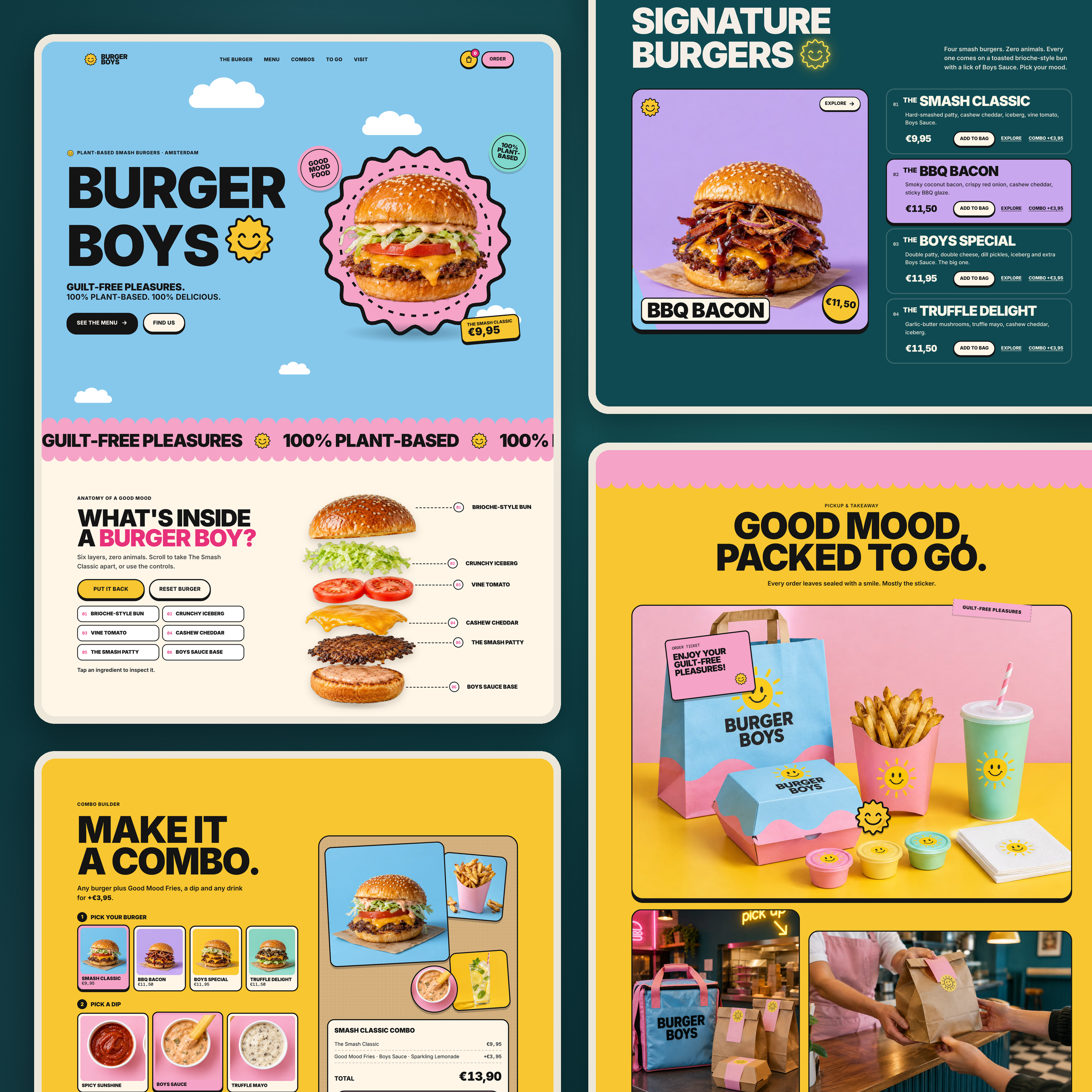
A good-looking site that sends customers through a checkout with nowhere for the order to go is worse than a basic page that honestly says “Call us.” That is why Burger Boys labels its checkout as a demo.
Write down these requirements before touching the builder:
- Business basics: restaurant name, description, real address, contact details, opening hours and service area.
- Menu: categories, descriptions and prices, modifiers, allergens, photos, unavailable items and seasonal changes.
- Conversion: pickup or delivery, booking if relevant, payment methods and order confirmation.
- Operations: staff notifications, POS integration, kitchen workflow, refunds and support.
- Marketing: local SEO, analytics, restaurant marketing channels, social profiles and an up-to-date Google Business Profile.
If you don’t know the answers yet, let AI tools help structure the questions. Don’t let it invent the answers.
Which builder fits your restaurant?
There are plenty of “best restaurant website builders” lists online, but a single winner would be a strange answer when a coffee shop, a multi-location chain and a delivery-only kitchen need different things.
Here is how I’d narrow the options, based on the features the providers currently describe:
| Route | Best for restaurant owners who… | What to verify before choosing |
|---|---|---|
| Wix Restaurants | Want a restaurant-specific system with products, orders and table reservations in the same environment | Supported order types, plan requirements, payments, delivery integrations and POS options in your country |
| Hostinger AI Builder | Need a quick site or starting design generated from a description, with editing tools | Whether its ordering, payment and booking features cover the actual restaurant workflows you need |
| 10Web | Want a generated site with restaurant-oriented content and management options | Exactly which booking, menu-management and order flows the chosen plan supports |
| WordPress + Elementor | Want control over a flexible WordPress site and are willing to manage plugins and hosting | Which plugins handle the food catalog, bookings, WooCommerce checkout or POS integration, and who maintains them |
| AI-assisted custom code | Want an unusual visual experience or specific interactions outside typical templates | Developer availability, content management, security, payment flow, support and maintenance |
Wix’s official restaurant documentation covers menus, orders and reservations, with plan and setup requirements for taking payments. Hostinger describes its AI Builder as a way to generate a starting site and refine it through conversation or visual editing. Elementor offers a WordPress restaurant website builder, though the restaurant-specific operational stack still needs to be chosen. 10Web also documents AI-generated restaurant sites with editable menus, locations and booking tools.
If you want to create a restaurant website quickly, a hosted AI website builder may be the most practical route. An AI restaurant website builder is useful only if it supports the real workflow behind the screen. A hosted platform can be the best for owners who need something dependable this month. Custom development becomes interesting when the business has unusual requirements, or when the online experience itself is part of the brand.
Step 1: Describe your restaurant before asking AI to design anything
Start with a real brief. The usefulness of an automatically generated site is limited by what you can tell it about the business. “Modern restaurant website” is an excellent way to get the same three stock sections that every template uses.
For Burger Boys, my brief identified a plant-based smash burger concept, a loud, cheerful personality and a simple product range. The key visual ideas were oversized type, pink and sky blue, a smiling sun and mouthwatering burger imagery. That gave the design a reason to look the way it does.
For a real restaurant, use this reusable prompt to plan the website for your restaurant:
Prompt 1 — Your brief
You are helping me plan a restaurant website. Ask only for information that affects the website or ordering experience. My restaurant is [NAME] in [CITY]. We serve [CUISINE] to [CUSTOMERS]. Our service model is [DINE-IN / PICKUP / DELIVERY / MIX]. Our main differentiator is [WHY SOMEONE CHOOSES US]. We currently use [POS / BOOKING / DELIVERY SYSTEMS OR NONE].
Produce a concise website brief: primary audience, top three customer tasks, required pages, navigation, menu data needed, third-party integrations, accessibility and mobile requirements, launch blockers, and a list of facts to verify. Never invent our location, prices or opening hours. Mark missing information as [NEEDS CONFIRMATION].
This gives the builder something useful to work from. It’s also a way to discover that you still haven’t decided who receives online orders or who changes the lunchtime offerings.
If you’re still shaping the identity itself, I wrote a separate restaurant brand-building guide with nine prompts. That covers the positioning, naming, imagery and packaging decisions that should come before a finished website.
Step 2: Build the food catalog as structured data
I wouldn’t start by designing food cards. I’d start with a spreadsheet or JSON record for every item. Every item should have a unique ID, name, description, price, category, availability, ingredients, allergen notes and modifier rules.
A simple product record could look like this:
{
  "id": "smash-classic",
  "name": "The Smash Classic",
  "description": "Plant-based smash patty, cashew cheddar, iceberg, vine tomato, Boys Sauce",
  "price_eur": 9.95,
  "category": "burgers",
  "available": true,
  "modifier_groups": ["extras", "remove_ingredients"],
  "allergens": "[VERIFY WITH KITCHEN]"
}
That’s an illustrative Burger Boys product record, not verified nutritional or allergen information. In a real kitchen, the staff must check ingredients and cross-contact risks. The assistant should never be the final authority for allergen data.
Once the data exists, the same data can feed a digital menu, product cards, a checkout and printed content. Price updates are easier to manage when they happen in one place.
Ask a reviewer or assistant to spot missing fields or inconsistencies, but review the output against your actual prices and items before publishing.
Step 3: Choose how to create the site
Path A: Use a hosted builder without coding
If you want a simple site with a home page, food choices, hours and contact details, start with a platform built to support that work. In Wix or a comparable service, you can choose a restaurant template, populate the food selection and connect supported ordering or booking features. In Hostinger’s AI Builder, you describe your restaurant and get a starting site you can then customize.
A practical sequence is to:
- Choose a responsive restaurant template or generate a layout from your brief.
- Replace every stock photo and invented claim with approved materials.
- Import or enter the actual descriptions and prices for every item.
- Connect the ordering, pickup or delivery feature that the business will really use.
- Add opening hours, contact details, map and Google Business Profile link.
- Test a real checkout or booking through the provider’s supported sandbox or test procedure.
- Check the desktop and mobile views, then publish.
That is a good choice when owners need something functional, easy to navigate and relatively straightforward to maintain. Don’t assume a platform supports a particular POS or local payment provider just because it has a “restaurants” label. Verify the integration.
Path B: Use coding tools for a custom experience
Burger Boys was the creative route. I supplied the concept, design references and site requirements, used generated concept imagery, and worked through the interface and development in iterations. The original site code includes GSAP-driven animation; the live experience has a six-layer anatomy sequence, interactive product cards and a combo builder.
The main advantage here is creative freedom. The tradeoff is that you now own the job of testing and maintaining what you build. A coding agent can create an impressive demo without the security, data structure or restaurant integrations needed for production.
For a practical custom workflow, I would separate three tasks:
Content and structure: Use ChatGPT or another assistant to build the brief, menu schema and page architecture.
Art direction: Give the builder real references for colors, typography, photography, graphic shapes and packaging. If using generated food imagery for a concept, disclose it. For an operating restaurant, photograph the actual dishes and kitchen.
Implementation: Use Claude Code or a similar coding assistant to create the responsive page, menu components, animations, form states, accessibility controls and tests. Review the code, don’t merely accept a polished screenshot.
You can see an earlier example of this process in my ChatGPT and Claude Code website concept experiment. That piece is about fast prototyping, not shipping a production system in half an hour.
Step 4: Give the builder a usable implementation prompt
Here’s a prompt you can adapt after you have the brief and your product data. It aims for a working demonstration, not a make-believe checkout passed off as a complete business.
Prompt 2 — Build the site
Build a responsive site for the fast food brand [NAME] using the verified brief, approved brand assets and structured menu data supplied with this prompt. Do not make up menu items, prices, addresses, ratings, opening hours, delivery partners or customer reviews.
Pages/sections: homepage, menu categories, item details with ingredients and allergens, pickup/delivery information, location and hours, about, and accessible contact details. Use the actual restaurant menu data rather than embedding prices in multiple components.
Design: follow the supplied visual references for color, typography, spacing, food photography and brand graphics. Build an easy-to-navigate mobile experience. Make the main actions visible immediately and keep animations subtle around critical tasks.
Interaction: product selection, modifiers, quantity, cart state, correct subtotal, empty/error states, keyboard navigation, and reduced-motion preferences. Treat any checkout as DEMO ONLY unless an approved, tested payment and restaurant ordering integration has been explicitly configured.
Operations: provide clear integration points for the chosen POS, order management, pickup or delivery provider, booking service and analytics tools. Do not claim any external system is connected unless it is.
Delivery: write maintainable code, separate content data from presentation, provide a README, list all unverified assumptions, run available tests, and explain how the restaurant owner will update the menu. Show a working preview before deployment. Do not deploy or take payments without review.
Notice what’s missing: no demand for fifteen parallax effects, no arbitrary Three.js scene, no “make it award-winning.” Those may be nice in the right project, but they’re not restaurant requirements. Start with the behavior you need, then decide how much creative development is warranted.
Step 5: Design the menu and ordering experience around the actual customer
An intuitive online menu is one where customers can understand what they are choosing without doing a small research project.
For Burger Boys, I used a product-anatomy interaction to explain ingredients and a combo builder that lets people pick a burger, dip and drink. The interface updates the demo total as the selections change. It works because those choices are directly related to the food on offer.
For a real operation, I’d test the following before enabling direct online ordering:
- An item can be sold out without still appearing purchasable.
- Modifier prices, taxes, delivery fees and discounts calculate correctly.
- The customer gets a clear pickup or delivery time estimate only when the underlying system supports it.
- Checkout reports success only after the provider confirms payment and order acceptance.
- Orders reach the kitchen or POS reliably, including when a connection fails.
- Refunds, cancellations, missed pickups and support contacts are handled.
- A mobile user can order food without accidentally losing their cart.
This is where the difference between a working animation and a working business becomes impossible to ignore. The former can happen entirely in the browser. The latter needs integration with restaurant operations.
Step 6: Handle photography, branding and generated images carefully
I used generative tools for concept photography in Burger Boys because there was no real restaurant to photograph. The images create a convincing fictional world: branded bags, fries cartons, interior shots, burger close-ups and a storefront. The site says clearly that these are generated assets.
A real restaurant should not publish a generated burger that looks nothing like the dish leaving its kitchen. The problem isn’t whether the photo is technically impressive; the customer has paid for something specific.
Use generative systems to explore compositions, mood boards, lighting or graphic directions. Then work with actual food photography, or use carefully approved illustrations for parts of the site where literal product truth isn’t at stake.
For more on keeping those assets consistent, read my AI image consistency workflow. For documenting what the team is allowed to generate and publish, the brand guidelines template is a useful companion.
Step 7: Check SEO, mobile performance and the boring things that break websites
The site needs to load, and the customer has to find it in search. That’s not glamorous, but it tends to come before the first order.
Before launch, I would check these things in order:
Local discoverability. Make sure the address, contact details and opening hours are accurate and consistent with the Google Business Profile. Use a descriptive page title and actual content about the restaurant, service area and menu. A map is useful if you have a confirmed location. Don’t publish a fictional address just to fill a field.
Mobile navigation. Test the full path from landing on the page to opening an item, changing an option and completing the intended action. Use a real phone as well as browser device emulation.
Performance. Compress food photography, lazy-load secondary images, reserve image dimensions so the layout doesn’t jump and avoid forcing heavy animation on every device. Check actual measured performance rather than guessing from a screenshot.
Accessibility. Use readable text, keyboard-accessible controls, meaningful image descriptions, appropriate contrast and reduced-motion alternatives. Make sure people can use the menu without hovering.
Analytics. Track useful actions such as product views, add-to-cart, completed checkout or booking, where those events are genuinely available. Analytics tools help you investigate what happens, but they don’t prove why someone left.
If you’ve already launched a site, my AI website audit worksheet explains how to review screenshots, content and measured reports without inventing facts.
Step 8: Publish, then test the full restaurant workflow
For a custom-coded site, a host such as Vercel can deploy from a connected Git repository or the CLI. The Vercel deployment guide covers those methods. For a hosted website builder, use its own publishing and domain setup.
Don’t confuse “the website is live” with “the restaurant is ready to take online orders.” After deployment, place a test order through the real integration, check the kitchen receipt, verify the confirmation, and test what happens when payment fails. Then run the whole flow from a phone on ordinary mobile data.
And decide who maintains the site. Someone must update prices, descriptions, opening hours, promotions and availability after the launch party is over. A beautiful custom restaurant site without a reliable editor becomes very expensive every time somebody adds a sauce.
What Burger Boys demonstrates, and what it doesn’t
Burger Boys is useful because it makes the creative potential easy to explore. The hero has personality, the products are visual, the ingredient animation is playful and the combo builder makes browsing feel participatory. You can see the interactive demo yourself.
It isn’t evidence that software can run a restaurant without a human. There is no live restaurant, no active delivery operation, no POS integration and no real payment processing. I haven’t measured order conversion or customer acquisition, because there are no actual customers.
The takeaway is more practical: These tools can help you go from a restaurant idea to a convincing, testable website much faster, but somebody still has to make the design decisions, verify the facts and connect the business operations.
If you need a quick site, use a suitable restaurant-specific platform. If your concept deserves a distinctive interactive experience, use assisted development carefully and budget for production integrations. Neither choice is automatically more professional; the better one is the one the restaurant can actually operate.
For the visual thinking behind Burger Boys, see my restaurant website design case study on BBDirector.
FAQ: Building a restaurant website with AI
Can I create a site without coding?
Yes. A hosted site builder can generate an initial layout and content, then let you customize it. You still need to verify the food selection, payment features, location and ordering integrations before launch.
What is the best builder for a restaurant?
There isn’t a universal winner. Wix Restaurants emphasizes menus, orders and reservations. Hostinger’s builder focuses on generating and editing a site from prompts. WordPress with Elementor is flexible but requires suitable plugins and maintenance. The best choice depends on your restaurant needs and location.
Can a builder generate item descriptions?
It can help structure, rewrite and format your menu, but the kitchen must supply accurate ingredients, allergen information, descriptions and prices. Never publish generated allergens or invented dishes as verified facts.
Can a custom site take online orders?
Only after a real ordering system, payment provider and restaurant workflow are connected and tested. A functioning cart animation is not the same as a verified checkout or a kitchen ticket.
Do I need booking and table reservations on a fast food website?
Not necessarily. A takeaway-focused operation may need pickup and delivery far more than table booking. Choose the restaurant features that match how people buy from you.
Can I build restaurant sites this way and hand them to clients?
Yes, but the handover matters. Include verified menu data, editor access, ownership of the domain, integration documentation, privacy and payment responsibilities, and instructions for updating the site. A handoff without those is a prototype, not a maintainable business website.