
How much of a face does an AI agent need? We tried giving Pal a mouth. It immediately started looking more like an emoji. The two bars were enough.
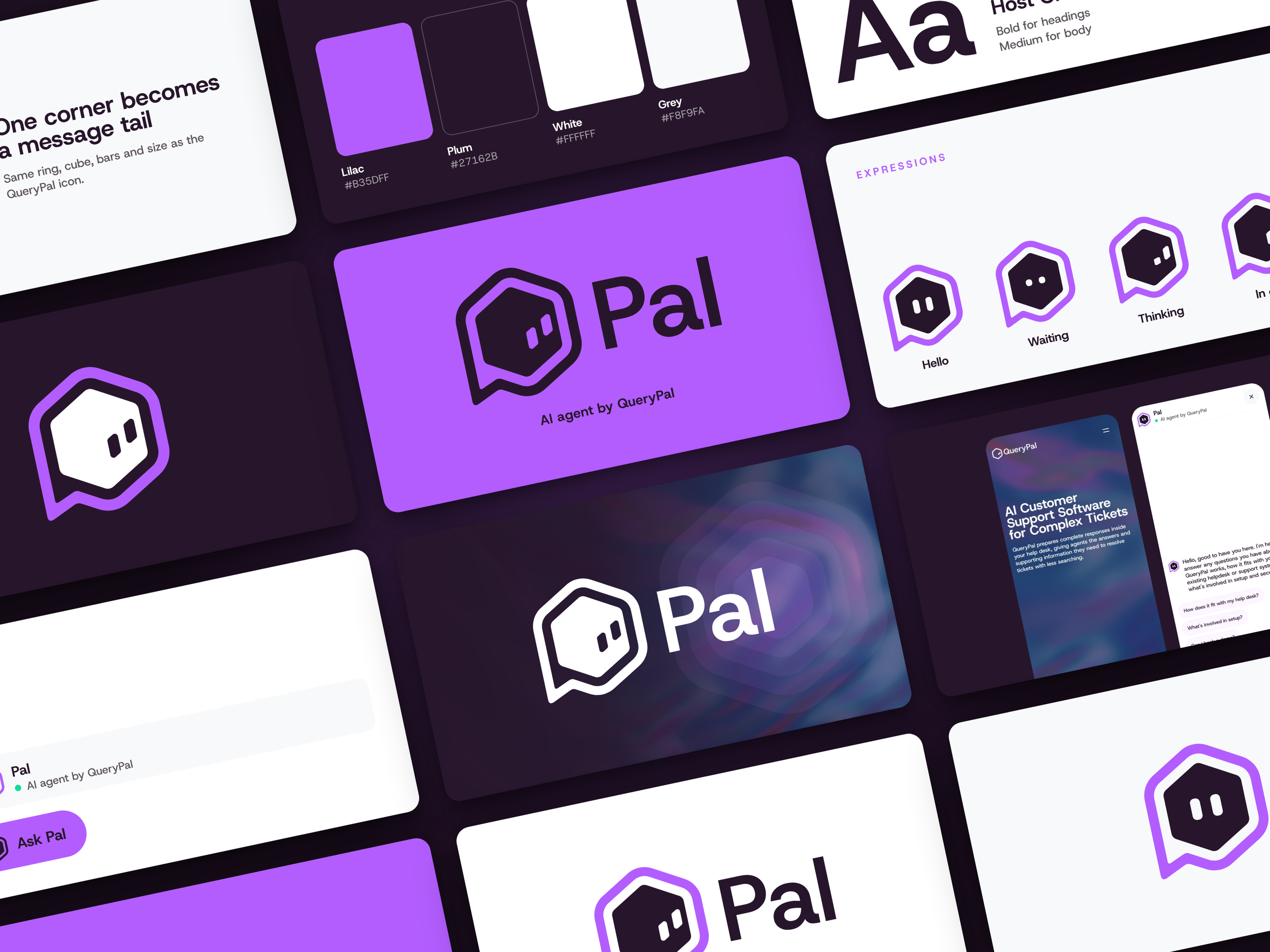
Pal is the name and visual identity I developed for QueryPal’s AI sales agent. The name comes from QueryPal, and the icon keeps the existing brand geometry with one corner extended into a speech tail. Its expressions work by changing the two bars inside the mark.
That project got me thinking about chatbot personality more broadly. A small visual decision can give an agent character. But once someone starts talking to it, its behaviour has to make sense too. A friendly icon can introduce the experience; the responses have to carry it.
What is chatbot personality?
Chatbot personality is the character people perceive through an agent’s language, tone, behaviour and presentation. It includes how it introduces itself, answers questions, handles confusion and responds when it cannot help.
A chatbot persona is a practical specification for those choices. It can cover the audience, role, tone of voice, boundaries and examples of suitable responses. “Helpful and friendly” is a beginning, but it leaves a lot open to interpretation.
For a business, the useful question is what behaviour fits the job. Someone comparing software wants clear answers. Someone reporting a problem wants the problem taken seriously. The personality should make those conversations easier to follow.
What Pal’s identity actually includes
The completed identity work gives Pal a name, an icon, a colour and typography system, expressions, and application mockups. The visual states include Hello, Waiting, Thinking and In chat. The outside shape stays consistent while the two bars change.
The interface concept also identifies Pal as an “AI agent by QueryPal.” That line matters because visitors should be able to understand what they are interacting with. A familiar name does not need to create uncertainty about whether the agent is human.
This article uses the design project as an example. The conversation brief and testing approach below are my recommendations for building a chatbot experience; they are not a claim that I implemented those rules in QueryPal’s production agent.
Define chatbot personality traits around the job
Before choosing whether your AI assistant should sound warm, witty or formal, write down what it is there to do. Also decide which questions should go to a person.
For example, a small business might want a website assistant to explain services, answer questions from approved material and direct enquiries to the right contact. That is a manageable role to describe. “Represent our business brilliantly” leaves the important decisions unresolved.
Then define the target audience. A first-time visitor may need plain explanations and examples. An existing customer may need a direct answer with minimal introduction. The same brand voice can accommodate both by changing the level of detail.
Different chatbot personalities can suit different jobs, but a consistent personality needs more than a list of traits. Tone and style should help the conversational flow. A playful introduction may fit a product demo; a frustrated customer usually needs a direct, empathetic answer.
Choose observable rules. “Keep the first answer brief, expand when asked, and say when information is missing” is more actionable than “sound intelligent.” You can test whether a response follows the first instruction. The second is mostly a matter of taste.
Use the visual system to support the interaction
With Pal, the name and icon retain a direct connection to QueryPal. The speech corner suggests conversation, and the two bars give the agent a small set of expressions. That makes the identity feel related across its different uses.
For your own chatbot design, decide which elements remain fixed and which can change. The avatar should remain recognisable when it is small. State changes should be clear enough to support the interface without requiring the visitor to study the animation.
A “thinking” expression is a visual cue, not evidence that an answer has been checked. If you use animated states, connect them to real interface events and pair them with accessible text where needed. The animation should help explain what the system is doing.
Also check the launcher, chat header and message avatar together. These are parts of the same experience. It is surprisingly easy to design a lovely brand board and then discover that the avatar is barely readable where it will actually be used.
A practical AI chatbot persona template
Here is a starter brief for a hypothetical business assistant. Adapt it to the product and the information your system can actually access.
Role: Help visitors understand the business’s services using approved information and choose an appropriate next step.
Audience: Prospective customers who may be unfamiliar with the service and its terminology.
Voice: Clear, approachable and direct. Use ordinary language. Explain necessary technical terms. Keep humour light and leave it out when someone is frustrated.
Identity: Introduce the assistant as AI. Use the business name and the agent name consistently.
Answer style: Answer the question first. Add relevant detail and ask a follow-up only when it is needed to give a useful answer.
Limits: Do not invent prices, availability, integrations or commitments. If the approved information does not answer the question, say so and offer the configured human contact route.
Next step: Suggest a relevant action without pretending that a booking, payment or handoff has happened unless the system confirms it.
A developer can translate this brief into the relevant system prompt and response guidelines for the chosen platform. Review those instructions together, including examples of what the bot should say when an answer is unavailable.
This is a content brief, not a security mechanism. Access controls, tool permissions and reliable action handling need to be implemented in the application itself.
Test behaviour with ordinary and awkward questions
A persona is only useful if it survives actual conversation. Build a small test set before making it part of a customer-facing experience.
Try a straightforward service question. Then ask the same thing vaguely. Ask about a feature the business does not offer, a price that is not listed and a request the assistant cannot complete. Include an irritated message and a question that needs a human decision.
Judge the responses on correctness, clarity, tone and the next step offered. A cheerful answer that invents a capability fails the test. A plain answer that explains a limitation and gives a workable route forward may be exactly right.
Use user feedback to improve the user experience after those initial checks. Look for repeated misunderstandings, unhelpful phrases and points where the visitor cannot find a useful next step.
Keep the examples and the revisions so you can rerun the same checks when the instructions or knowledge change. My prompt testing guide covers that process in more detail.
Keep the personality consistent as you launch
Bring the name, avatar, introduction, example prompts and fallback messages into one review. Check that the visual identity and language set the same expectations. The person responsible for the business should also verify the factual answers and any promised actions.
For a broader rollout, use the brand launch checklist to keep the identity assets and their applications organised.
Pal’s visual system stayed small: a name already inside the parent brand, a speech corner and two expressive bars. That restraint is what I like about it. The next layer of any chatbot personality deserves the same care: clear language, predictable behaviour and an honest response when the answer is missing.