I’ve been experimenting with AI-assisted website development for a while, and one of the more interesting things I’ve discovered is that writing the code is becoming less of a barrier than knowing what you actually want to build.
That’s a significant change for designers, marketers, entrepreneurs, and small business owners.
You can now use tools like Claude Code to develop functional websites from detailed instructions, provided you understand enough about design, structure, and user experience to direct the process.
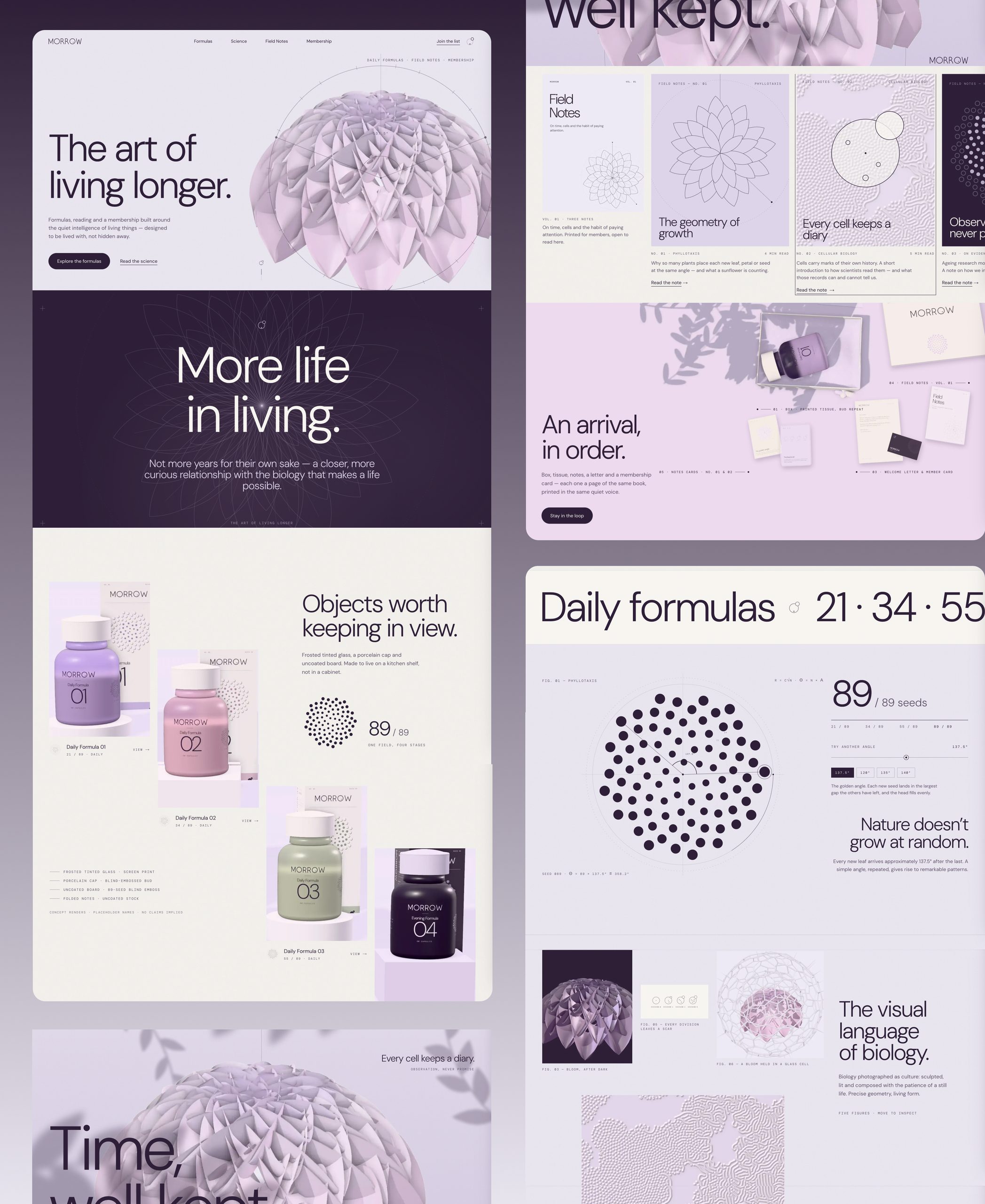
To explore how far I could take this approach, I developed MORROW, an interactive website concept for a fictional longevity and precision supplementation company.
I started with an existing visual identity presentation containing the logo, typography, packaging, imagery, and art direction. My goal was to transform those static assets into a functioning website, complete with animated sections, interactive product galleries, scientific visualizations, responsive layouts, and navigation.
The result is a live website hosted on Vercel.
In this article, I’ll explain the process I used to direct the build, how Claude Code fits into the workflow, what makes a useful website development prompt, and how you can apply the same approach to your own projects.
What is Claude Code, and can it actually build websites?
Claude Code is Anthropic’s AI coding agent. Unlike a traditional chatbot that provides snippets of code for you to copy, Claude Code can work directly with project files, create components, edit existing code, execute development commands, and help identify errors.
You can use it through a terminal, an editor, or supported desktop interfaces.
For website development, this means you can explain what you want to create, supply the necessary assets and references, and have Claude work through the implementation.
It can help with tasks such as creating React components, developing responsive layouts, implementing animations, building interactive elements, and preparing an application for deployment.
However, there’s a big difference between asking Claude to generate a website and directing it to build a good one.
If you type something like “create a premium website for a supplement company,” Claude has to invent nearly everything: the visual identity, page structure, content, user experience, and implementation details.
It might produce something functional, but there’s a good chance it will also look suspiciously similar to hundreds of other AI-generated landing pages.
For MORROW, I wanted to avoid that problem by giving Claude a complete visual direction before asking it to write any code.
Step 1: Start with a clear design system, not a generic prompt
Before working on the website, I developed a visual identity concept for MORROW.
The brand was inspired by botanical structures and the mathematics of natural growth, particularly the 137.5-degree golden angle found in certain plant arrangements.
The identity used soft lavender backgrounds, dark aubergine typography, sculptural floral imagery, fine scientific illustrations, and a four-product packaging system.
All of this was documented in a 12-slide presentation.
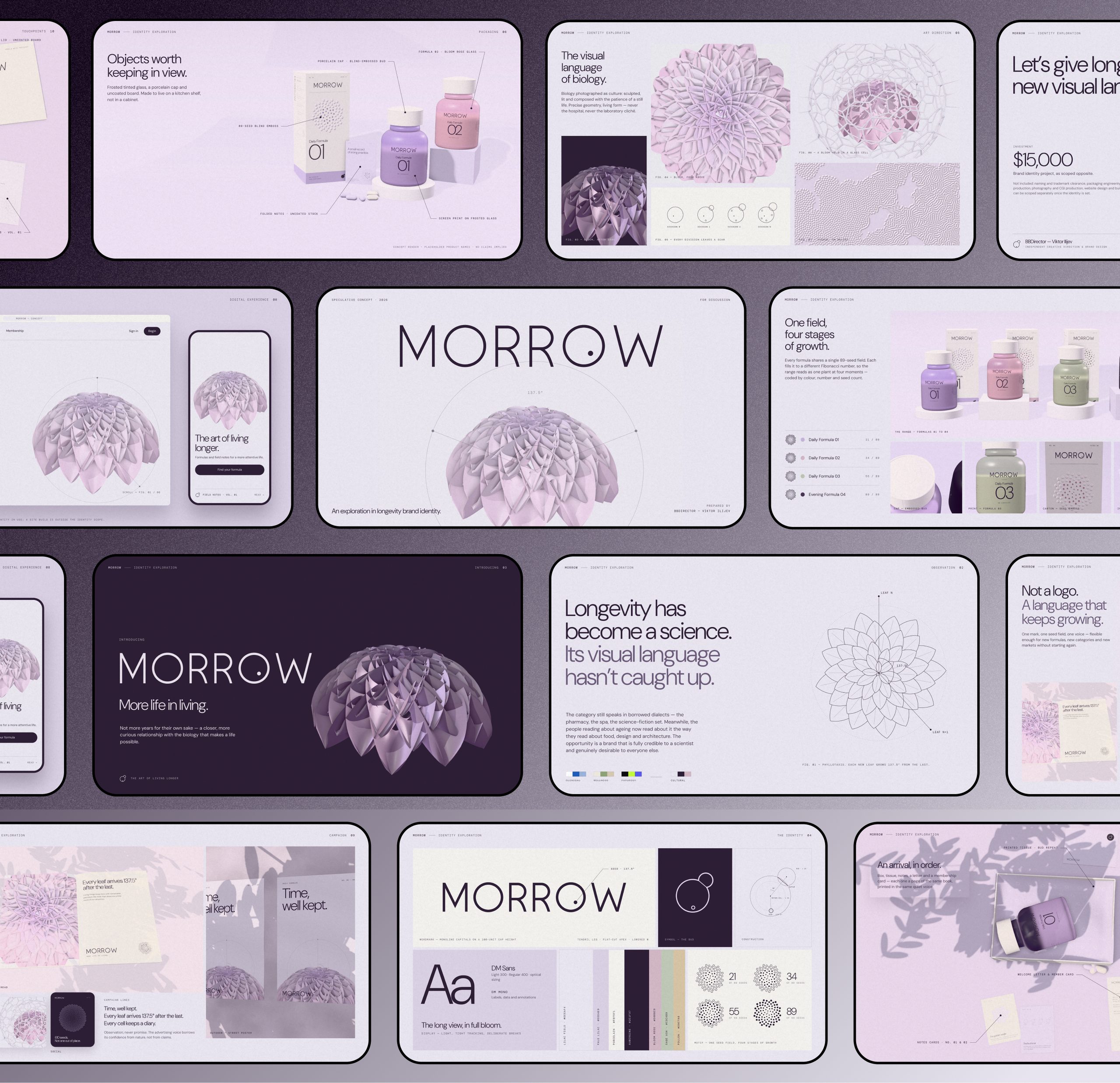
This gave the website development process an important advantage: the design decisions weren’t starting from zero.
Claude had a reference for what the website should look and feel like, including the colours, typography, visual hierarchy, imagery, and overall brand personality.
I supplied the presentation as a PDF and instructed Claude to study it before building the website.
I also made it clear that the website should not simply reproduce the slides. The identity needed to be translated into actual web components, responsive layouts, and interactions.
Why visual references matter when building websites with AI
One of the most useful things you can do when working with Claude Code is provide good reference material.
That might be a Figma design, brand guidelines, existing website screenshots, a PDF presentation, or even a collection of visual references showing the kind of art direction you’re after.
The more useful information you provide, the fewer decisions Claude has to invent.
But there’s an important distinction between supplying a reference and asking an AI to copy it.
I wasn’t trying to turn twelve presentation slides into twelve website sections.
I wanted Claude to understand the design language and then apply it to a different medium.
That’s a much more useful way of working with AI website development tools.
Step 2: Plan the website before generating the code
The next step was defining the website structure.
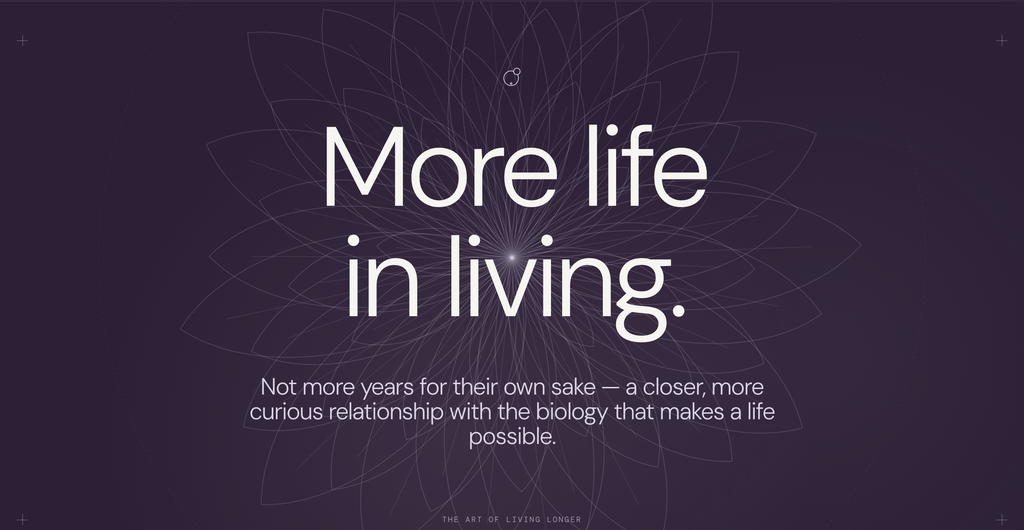
For MORROW, I wanted the experience to move between brand storytelling, product discovery, scientific education, and editorial content.
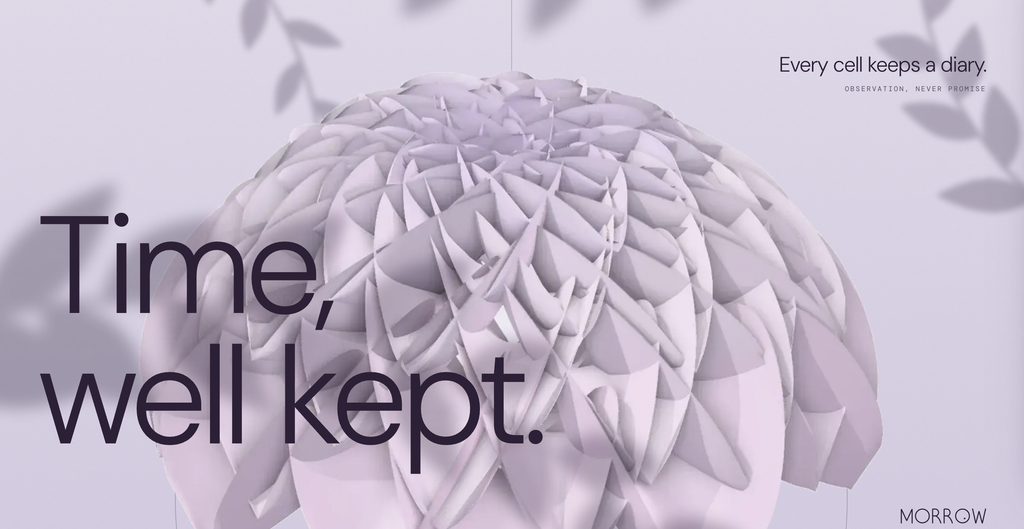
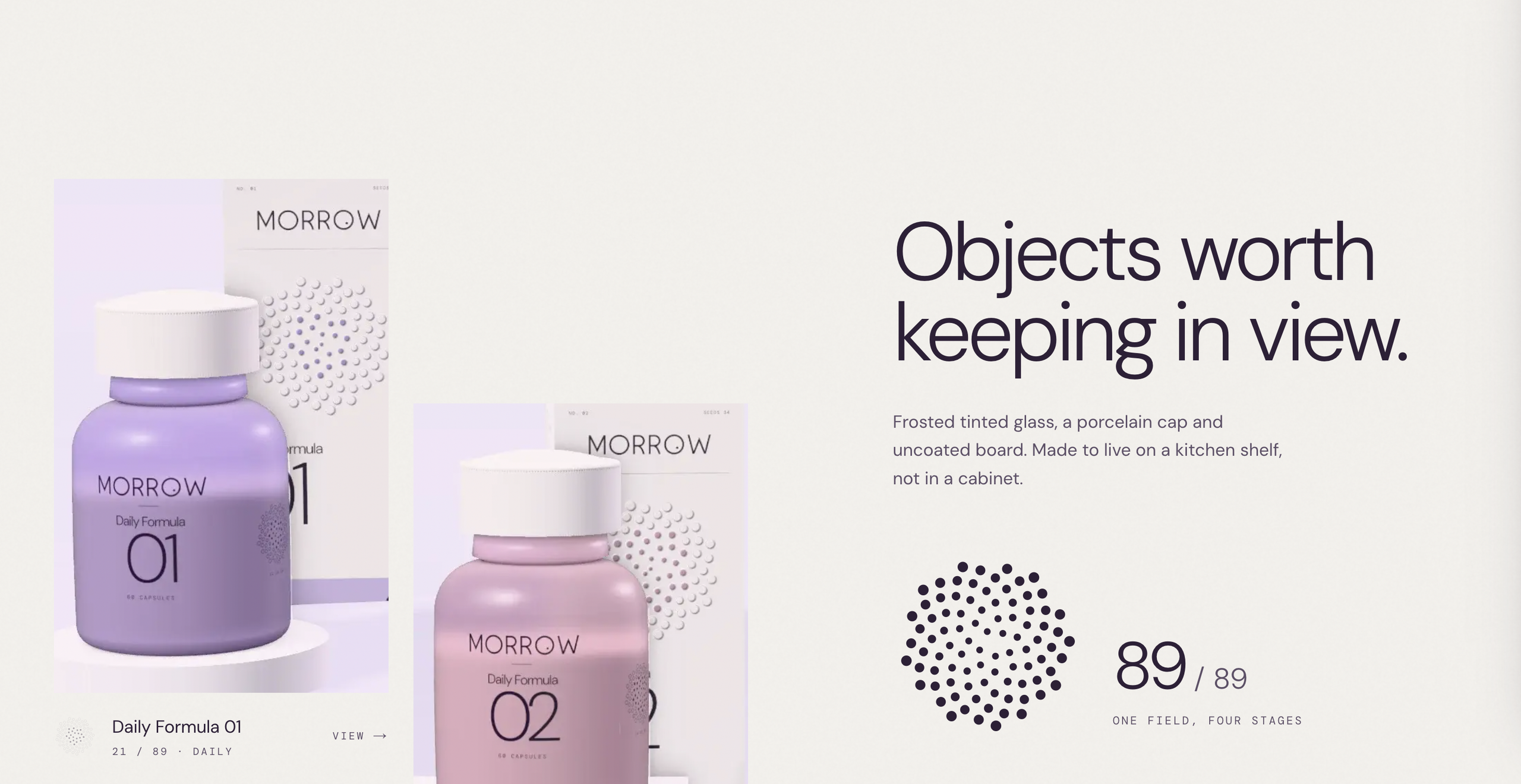
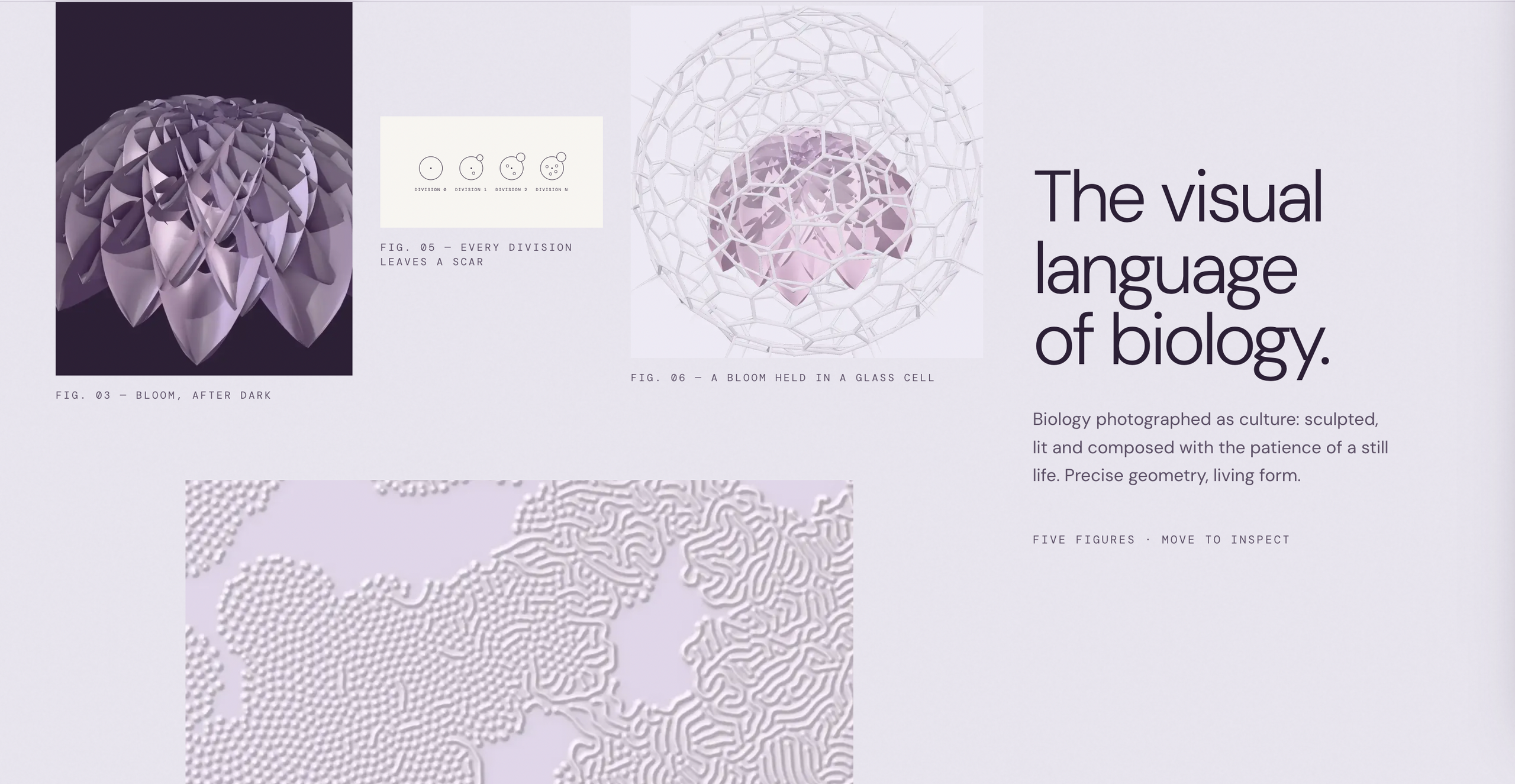
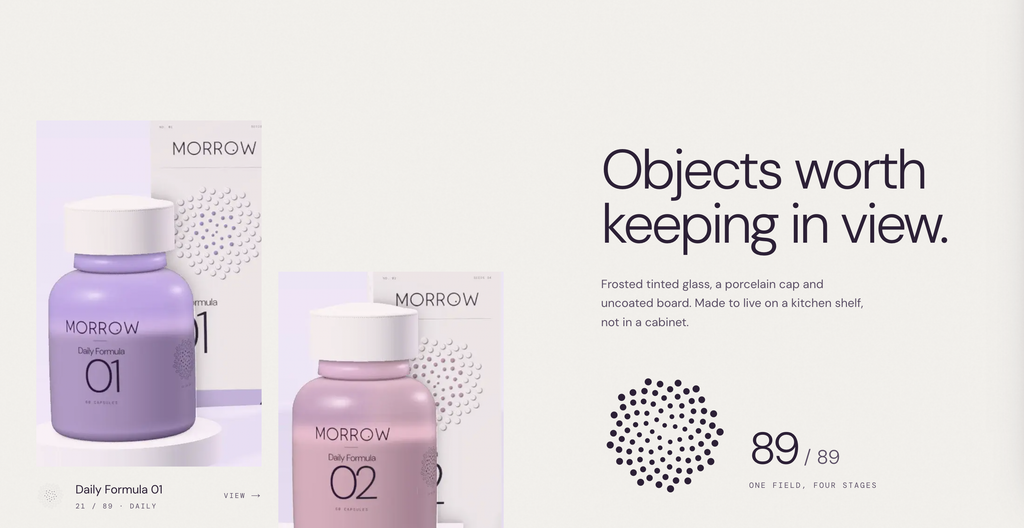
The website includes a large botanical hero, a philosophy section, an interactive gallery of four fictional supplement products, an animated scientific visualization, an image-led biological gallery, a campaign section, Field Notes articles, and a membership concept.
Each section needed its own visual purpose.
One instruction I was especially particular about was avoiding repetitive layouts.
You’ve probably seen AI-generated websites where every section starts with a small label in the top-left corner, followed by a giant heading, a paragraph, and a button. Then the next section does almost exactly the same thing.
It’s a perfectly serviceable pattern, but it quickly becomes monotonous.
For MORROW, I explicitly instructed Claude to vary the compositions.
Some headlines needed to be centered. Others could sit toward the bottom-right, appear beside oversized imagery, or occupy a narrow editorial column.
I also wanted the photography, diagrams, typography, and empty space to work together, rather than treating each section like a reusable marketing template.
What I learned about prompting Claude Code for website design
It helps to describe the behaviour you want to avoid just as clearly as the behaviour you want to encourage.
Instead of saying:
“Make the website creative and modern.”
Try something more specific:
“Design each major section as an independent editorial composition. Vary the headline alignment, scale, image placement, and use of negative space. Avoid repeating the same two-column layout or placing every headline in the top-left corner.”
That instruction provides Claude with an actual design constraint.
And good design is largely about making deliberate decisions within constraints.
Step 3: Add animations that explain something
Animation was an important part of the MORROW website, but I didn’t want movement for the sake of movement.
The most interesting example is the interactive phyllotaxis visualization.
Phyllotaxis describes the arrangement of leaves, petals, seeds, and other botanical structures.
In many plants, these arrangements follow patterns involving the golden angle, approximately 137.5 degrees.
In the original brand presentation, I had illustrated this concept through static diagrams. On the website, I wanted visitors to be able to experiment with it.
The resulting section includes an interactive seed visualization where users can explore different angles and observe how the arrangement changes.
The interface offers the original 137.5-degree pattern along with alternative angles such as 120, 135, and 140 degrees.
This is a good example of how interactive web development can communicate something that a static graphic cannot.
Instead of reading about a mathematical pattern, visitors can manipulate it.
How to approach website animations in Claude Code
For projects like this, I’d recommend specifying the type of animation rather than simply requesting “lots of animations.”
Useful techniques include scroll-triggered text reveals, subtle image parallax, SVG line-drawing animations, product transitions, and interactive graphics.
For a React or Next.js project, libraries such as GSAP and Motion can help implement those interactions.
GSAP’s ScrollTrigger is useful for coordinating animations with scrolling, while SVG provides a practical way to create precise, scalable diagrams.
For a comparable build, these are technologies I would consider depending on the complexity of the interaction.
The important thing is to decide what each animation accomplishes.
A product transition might help distinguish between variations. A scientific diagram might become interactive to demonstrate a concept. A botanical image might move subtly to create depth.
If the movement doesn’t contribute to understanding, navigation, or the visual experience, there’s a good chance it isn’t necessary.
Step 4: Turn static brand assets into interactive website components
One of the more interesting challenges was translating MORROW’s physical brand identity into digital elements.
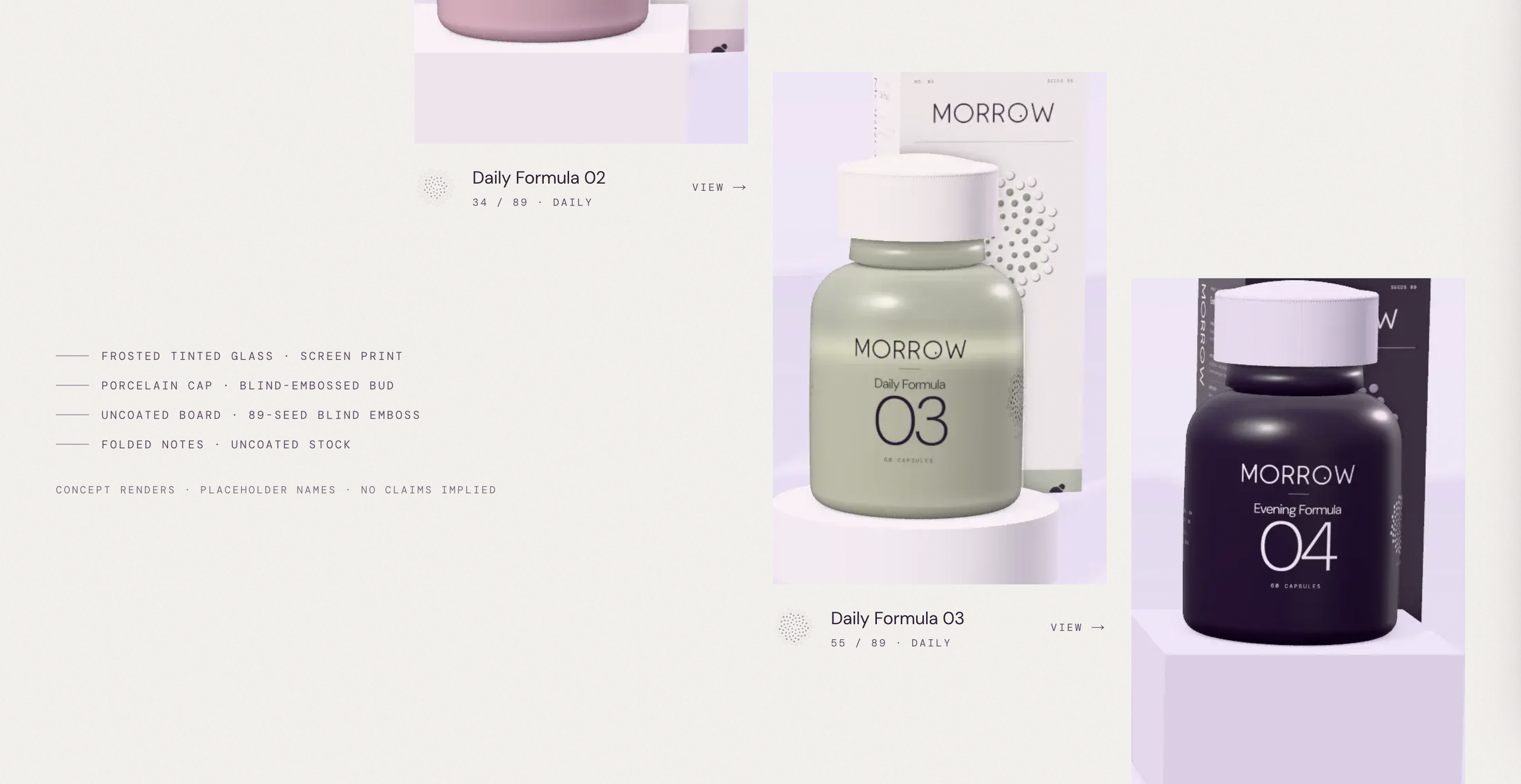
The original presentation contained packaging concepts for four fictional supplement formulas.
Each formula used a different colour and seed arrangement, but all four belonged to the same visual system.
For the website, I wanted those packages to become part of an interactive product gallery.
Visitors can browse the formulas and open individual product details to explore the packaging concept, materials, colour, and corresponding seed pattern.
The products aren’t commercially available. They’re illustrative designs with placeholder names rather than actual formulations.
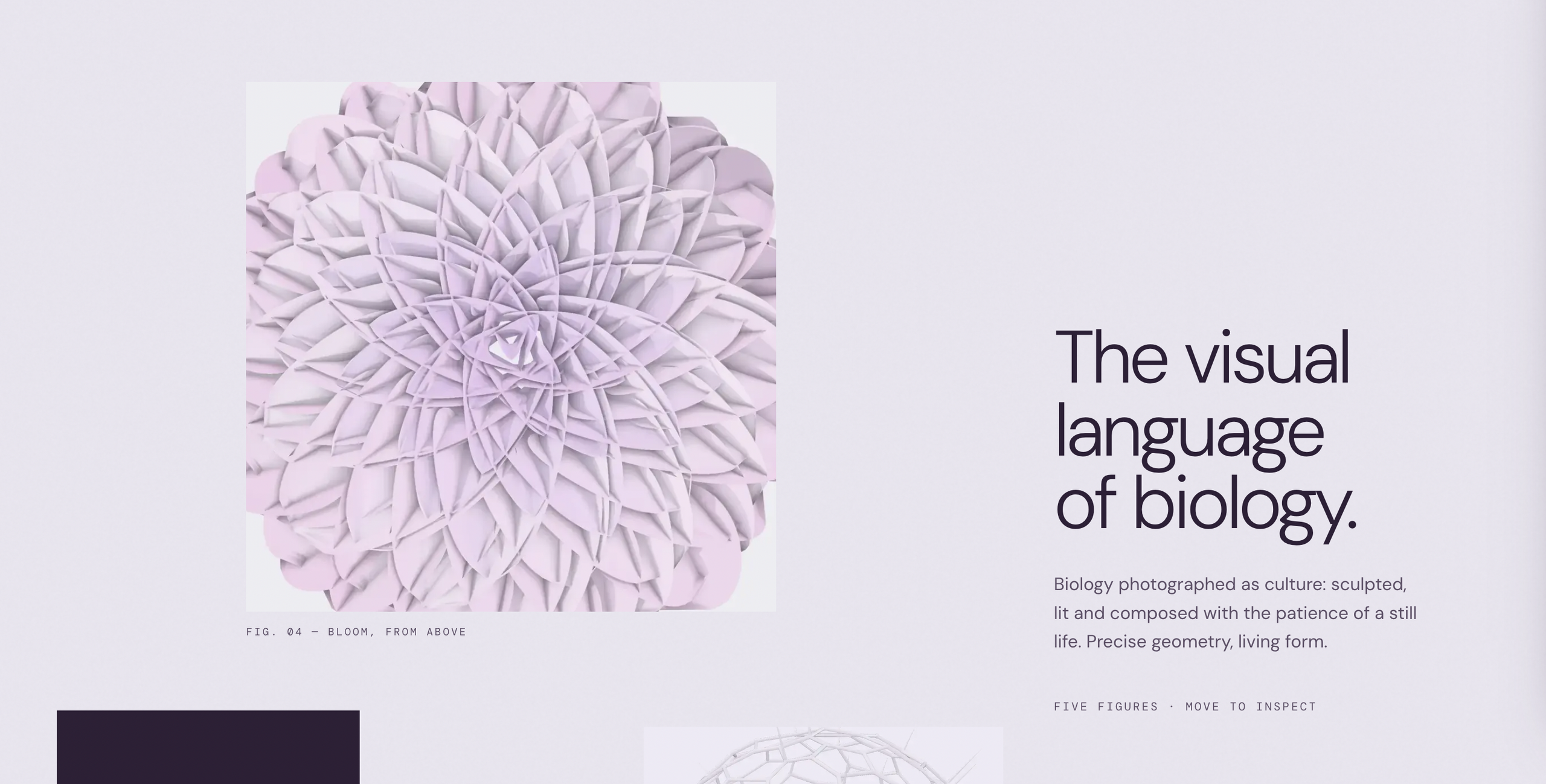
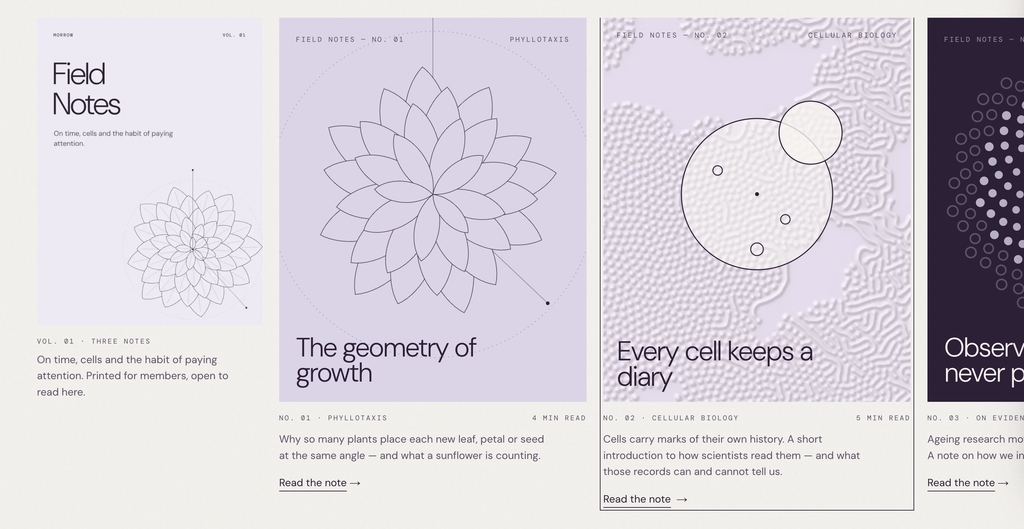
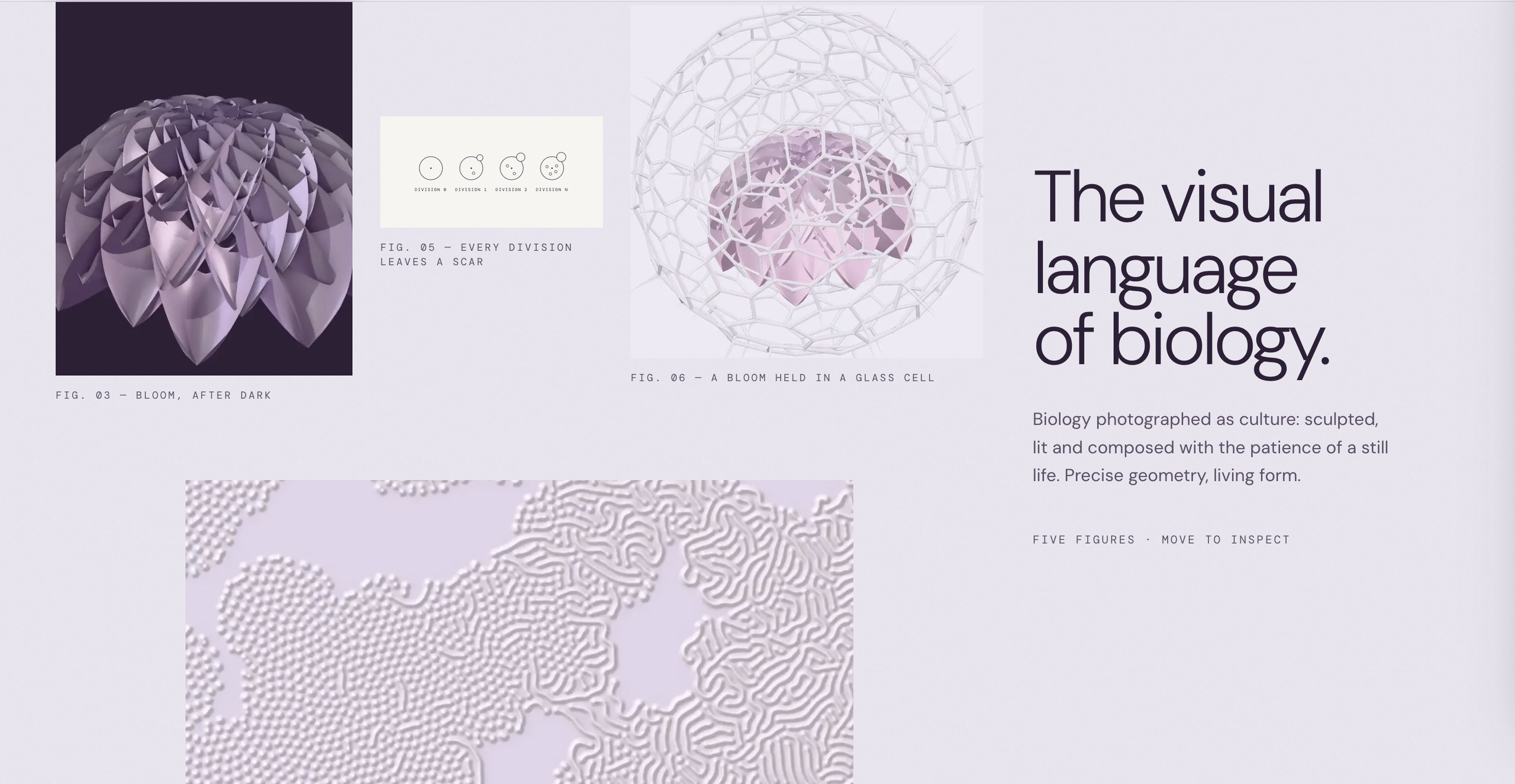
This process demonstrates something that I think is easy to overlook when building websites with AI.
The job isn’t always to create more visual material.
Sometimes the real challenge is taking an existing collection of brand assets and figuring out how they should behave inside a website.
An illustration can become an interactive visualization. A product mockup can become a gallery. An editorial publication can become an article interface.
That’s where website design begins to move beyond arranging text and images on a page.
Step 5: Give Claude Code a proper technical brief
Once the design direction and content structure were established, I created a detailed technical brief for Claude Code.
Rather than leaving the technology choices completely open, I specified a modern web development approach using Next.js, TypeScript, Tailwind CSS, and appropriate animation libraries.
I also included requirements for responsive design, accessible navigation, reusable components, image optimization, and Vercel deployment.
These were specifications for the build, not a substitute for checking the finished implementation.
For readers building something similar, here’s a simplified starter prompt that captures the most useful parts of that approach.
Example Claude Code website development prompt
Build a complete responsive website using Next.js, TypeScript, and Tailwind CSS.
First, inspect the brand reference files in the project folder and extract the visual identity, including colours, typography, imagery, and design motifs.
Create an editorial landing page with a hero, product section, interactive visualization, content gallery, and contact section.
Avoid repeating the same layout across every section. Vary headline positions, image arrangements, and content proportions while maintaining a consistent design system.
Use GSAP or another suitable animation library for refined scroll-triggered effects. Keep animations performant and respect reduced-motion preferences.
Make all navigation links and interactive components functional.
Test the website at desktop and mobile sizes, inspect screenshots, fix visual issues, and run the production build.
Prepare the finished project for deployment on Vercel.
Do not stop after generating the initial files. Run the application, verify its functionality, and correct any errors.
This is only a starting point.
For MORROW, the actual creative instructions were considerably more detailed, covering individual section compositions, animation concepts, art direction, product interactions, and mobile behaviour.
The lesson is that AI coding agents work much better when you give them a clear definition of the finished product.
Step 6: Review the website instead of accepting the first result
This is probably the least glamorous part of AI website development, but it’s also one of the most important.
You need to inspect what Claude actually produces.
An AI-generated website can compile successfully and still contain terrible typography, awkward image crops, broken buttons, overlapping elements, or sections that look nothing like the supplied references.
I recommend reviewing the website at multiple screen sizes and evaluating the result as a designer and a user, not just as someone checking whether the code runs.
Ask whether the hierarchy makes sense, whether people can navigate the page comfortably, and whether the interaction adds anything meaningful.
Claude Code can help with this process too.
You can instruct it to run the application, capture screenshots using a browser automation tool such as Playwright, inspect the output, and fix specific problems.
For example:
“Capture screenshots of the homepage at 1440px and 390px widths. Check for text overflow, inconsistent spacing, broken image crops, awkward responsive layouts, and navigation problems. Fix the issues and capture new screenshots.”
That’s considerably more useful than telling Claude to “make it better.”
The more specific the feedback, the easier it becomes to improve the result.
Step 7: Deploy the website to Vercel
Once you’re satisfied with the website and its production build, the next step is publishing it.
For MORROW, I used Vercel to host the finished website.
Vercel is particularly convenient for modern JavaScript applications because it supports frameworks such as Next.js and can automatically configure many of the necessary build settings.
There are different ways to deploy a project, but one practical method is to connect a GitHub repository.
For a typical Next.js project, the workflow looks like this:
- Run the website locally and check its functionality.
- Run
npm run buildand resolve any errors. - Commit the project to a GitHub repository.
- Import the repository into Vercel.
- Review the detected framework and build configuration.
- Add any required environment variables.
- Deploy the website and test the live version.
Vercel can also generate preview deployments when changes are pushed to connected Git branches, making it easier to review updates before publishing them.
You can find the current instructions in Vercel’s deployment documentation.
For MORROW, the deployed result is available here:
It’s worth remembering that deployment is not the same as completing a production-ready business website. Real projects may also need analytics, security reviews, legal pages, working forms, accessibility testing, search engine configuration, and back-end integrations.
In MORROW’s case, the site is a functioning conceptual experience rather than an operating supplement store.
What I would do differently when building another website with Claude Code
After developing a project like this, there are a few things I’d recommend to anyone using Claude Code for website development.
First, spend more time on the inputs. A solid brand identity, useful reference material, and clear content structure can make a bigger difference than writing a clever one-sentence prompt.
Second, separate visual direction from technical execution. Tell Claude what the finished website should feel like, but also explain how it should behave, what technology constraints it needs to respect, and how its output will be tested.
Third, build in stages. Get the visual system and overall layout working before spending time refining every animation. Otherwise, you risk building elaborate interactions into sections that still need redesigning.
Fourth, don’t let AI make every design decision. Claude can implement a layout, but you still need to judge whether that layout is appropriate for the audience, the content, and the business.
Finally, always test the actual result. A functioning website isn’t automatically a good website, and a good-looking screenshot isn’t proof that the mobile experience or interactions work correctly.
These principles apply whether you’re building a portfolio, a business landing page, an editorial website, or a more complicated application.
Can you build a professional website with Claude Code without being a developer?
I think the answer is increasingly yes, with an important qualification.
You can get much further without writing every line of code yourself, especially if you’re comfortable working with design references, defining requirements, and testing an application.
But the ability to generate code doesn’t eliminate the need to understand what you’re building.
If a website has a broken contact form, poor accessibility, insecure handling of user data, or serious performance problems, those issues still need to be solved.
For simple sites, AI-assisted development can make the process considerably more approachable.
For complex production applications, you still benefit enormously from software engineering knowledge and proper technical review.
What interests me most isn’t the idea of replacing developers or designers.
It’s that someone with a strong understanding of branding, user experience, and business requirements can now participate much more directly in building digital products.
MORROW is a good example.
It started as a visual identity presentation and developed into a functioning website with interactive scientific illustrations, product galleries, motion, and editorial content.
The underlying idea came from design and brand strategy. Claude Code helped translate that vision into a working digital experience.
Final thoughts: Building websites with AI is becoming a direction problem
I suspect one of the biggest changes AI coding tools will bring is a shift in where people spend their attention.
The question won’t simply be whether you can build a website.
It will increasingly be whether you can build one that communicates something useful, looks distinctive, works properly, and serves a real purpose.
Tools like Claude Code can help close the gap between an idea and a working implementation, but they can’t decide whether the idea is worth building.
That’s still your job.
If you’re experimenting with AI website builders, Claude Code, or Vercel, my advice is to begin with a small but well-defined project.
Give the AI strong references, explain what the website needs to do, define the technical requirements, and keep reviewing the result until it works.
And if you want to see what this approach can produce, explore the MORROW website and try the interactive botanical visualization for yourself.
Explore the live MORROW website
Project: MORROW — Interactive Longevity Website Concept
Creative direction and design: Viktor Ilijev / BBDirector
MORROW is an independent, speculative project. The products and company are illustrative, and the website is not a functioning commercial supplement store.