The first AI version of this campaign looked like a PowerPoint about a cereal. Flat shapes, vector tins, a billboard drawn in rectangles. Technically everything was there. None of it looked like a thing you could pick up.
I rejected the lot.
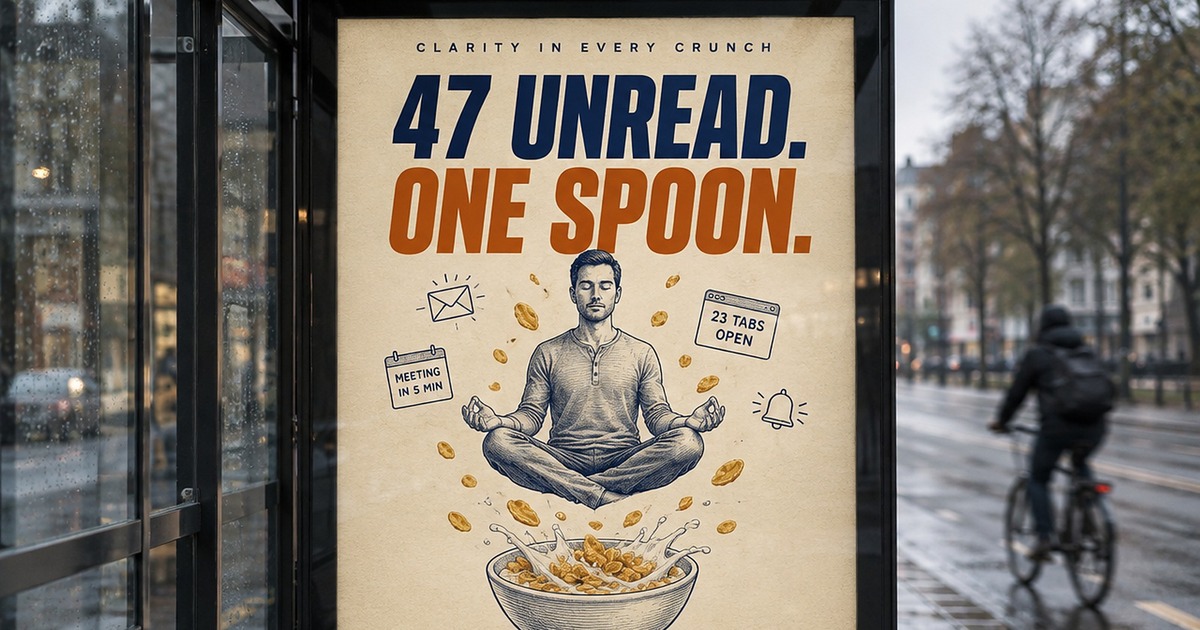
The second version is the one in this article: a cereal tin on a slate table, a billboard at dusk, a brochure on an oak desk, a subscription box on a hallway floor. Same brand, same AI, completely different result. The difference wasn’t a better model. It was a better process.
So this isn’t a list of the best AI tools. It’s a walkthrough of how one finished package design became a full campaign, what the AI did well, and the four places where a person still had to step in. The brand is Focus Flakes, a concept cereal for people with 23 tabs open. It’s not a real product.
First, what AI packaging design can and can’t do in 2026
Let’s get the honest part out of the way, because it’ll save you money.
An AI image model can generate a convincing photograph of a package that doesn’t exist. That makes it very good for two jobs:
- Packaging concepts. You can explore ten directions before lunch.
- Product mockups. You can see your tin on a desk, in a shop, in a box, before anything is manufactured.
What it doesn’t give you is anything print-ready. No dielines, no vector file, no layout a printer can use, no guarantee the small print is legal. Treat the output as a professional packaging photograph of an idea, not as the artwork. The real packaging still goes through a designer and a dieline.
If you remember one thing from this article, make it that. AI in packaging is a camera, not a factory.
Step 1: Write a style bible before you generate anything
This is where version one went wrong. Each image was prompted on its own, so each image drifted. Different orange, different lettering, a different man on every tin.
For version two, the original tin design was studied at full size and turned into one dense paragraph: lighting, lens, materials, the palette with hex values, the typography, the illustration style and the key copy lines. That paragraph gets pasted, unchanged, into every single prompt.
It’s boring. It’s also the single most useful habit in the whole workflow. I’ve written up the method in detail in how to keep AI images consistent across a campaign, and if you already have brand rules, this template turns them into instructions an AI can follow.
Step 2: One scene, one object, one photograph
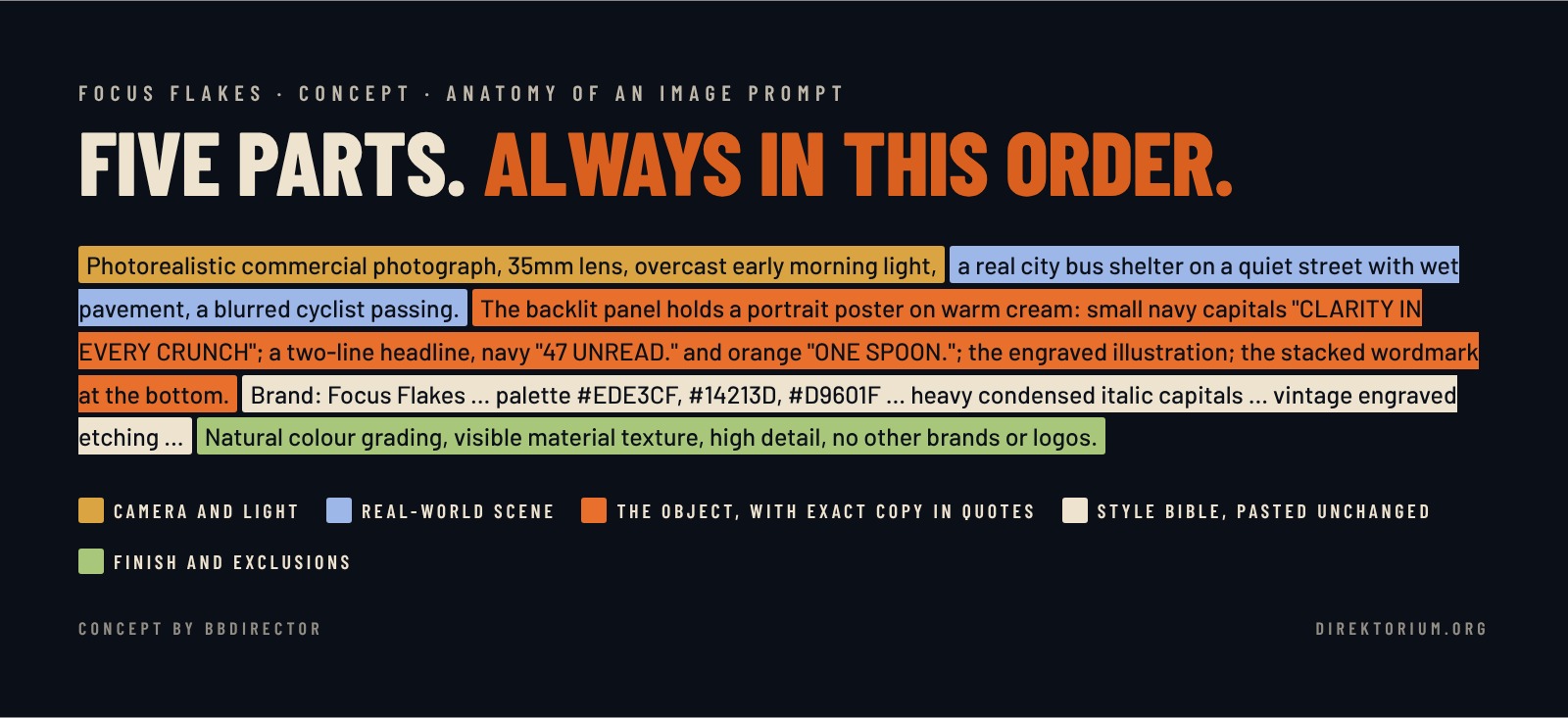
Every prompt has five parts, always in the same order:
- Camera and light. “Photorealistic commercial photograph, 35mm lens, overcast morning light.”
- The real-world scene. “A city bus shelter on a quiet street with wet pavement.”
- The object, with exact copy in quotes. “A portrait poster on warm cream. Headline in navy: ’47 UNREAD.’ Second line in orange: ‘ONE SPOON.'”
- The style bible. Pasted in full.
- Finish and exclusions. “Visible material texture, no other brands or logos.”
The rule that fixed the flat look: ask for one photographed object in one real place. A billboard at blue hour. A brochure on an oak table. A box on a concrete floor. The moment you ask for a “brand board” or a collage of packaging mockups, you get something that looks generated. Single photographs don’t.
For this project the images were generated inside Figma using a GPT image model. The same approach should work in Midjourney or any text-to-image generator that renders lettering reliably. There are also dedicated packaging generators such as Packify and Pacdora, and template tools like Canva. I didn’t use them here, so I’m not going to pretend I can compare them. What I can say is that for a campaign that has to match an existing brand, a general AI image generator plus a strict style bible gave me the control I needed.
Step 3: Read every letter. Yes, every one.
Here’s where the human eye earns its keep.
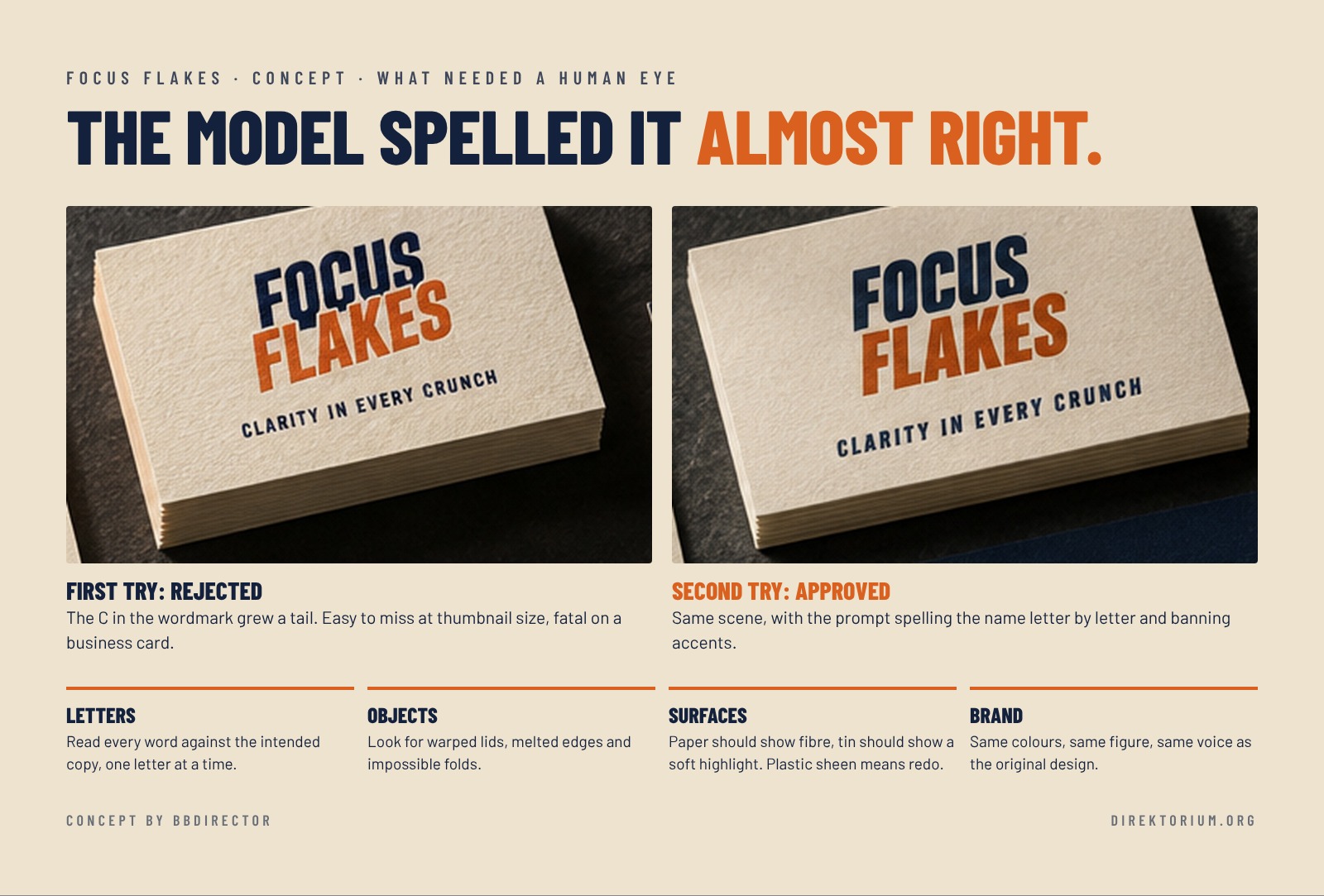
Fourteen images were generated for this campaign. One was rejected: the stationery. On the first try, the C in the wordmark had grown a small tail, like a cedilla. At thumbnail size you’d never see it. On a business card it would’ve been the only thing anyone saw.
The fix was to spell the name letter by letter in the prompt, say “no accents”, and generate again. The second try was clean.
The checklist I’d give anyone doing this is short:
- Letters. Is every word spelled the way you wrote it?
- Objects. Any warped lids, melted edges or impossible folds?
- Surfaces. Paper should show fibre. Tin should show a soft highlight. A plastic sheen means redo.
- Brand. Same colours, same figure, same voice as the original?
It doesn’t take long. Skip it and you’ll publish a typo in 96-point type.
Step 4: Don’t ask AI to draw your website. Build it.
AI is still bad at inventing a believable interface inside a laptop. You get lorem ipsum’s weird cousin and buttons that go nowhere.
So the screens in this campaign are real. The website and two app screens were built in code and screenshotted. Then the AI generated a photograph of a laptop and two phones with plain green screens, and the screenshots were placed onto the green with a perspective warp and a little glare.
The result is a real interface inside a generated photograph, which is the right way round. If you want to see how the build side works for a small business, I covered it in how to build a restaurant website with AI.
Step 5: Reel and copy
The reel is slow push-ins on the photographs with short captions. No voiceover, no stock music.
The copy for each channel was drafted with AI and then edited, because tone is the first thing a model flattens. The brand’s voice is dry. The first drafts were cheerful. Cheerful had to go.
Where AI fits in a real product packaging design process
If you’re a small e-commerce brand, or you work with packaging designers, here’s how I’d place AI for packaging design in the workflow:
| Stage | What AI does well | What still needs a person |
|---|---|---|
| Concept exploration | Ten directions for a premium product in an hour, from minimalist to loud | Choosing the one that fits the business |
| Design | Rough ideas for illustration and layout | The actual custom packaging: typography, on-pack text, legal copy |
| Production files | Very little | Print-ready dielines, vector artwork, colour for print |
| Photography | Photorealistic mockups that stay on-brand, replacing part of the photoshoot | Checking every image against the brand assets and the visual system |
The beginning and the end are where it helps most. In the middle, professional packaging design is still professional packaging design, whether it’s one pouch for a market stall or a full FMCG range.
How to choose AI tools for packaging design without a ranking
I’m not going to rank tools, because AI models change every few months and any list would be out of date before you finished reading it. Ask three questions instead:
- Can it render the words on the pack correctly?
- Can it keep generated designs consistent across a series?
- Does it give you a high-resolution file you can actually use?
Whether a tool calls itself AI-powered matters a lot less than whether the result survives being zoomed in.
What I’d tell a small business owner
Use AI for the photograph, not for the judgement.
It’s good at volume. It’s bad at knowing which image is right, and it has no idea your brand name doesn’t have a cedilla in it. Keep the brief, the style bible and the final check with a person, and you’ll get hours of work that would otherwise take weeks.
If you don’t have the brand yet, start there instead. I walk through that in how to create a brand identity with AI.
You can see the finished Focus Flakes concept, including the live website, at focus-flakes-concept.vercel.app. And if you’d rather have someone run this workflow for your product, get in touch.